On this page
- The minute-zero question
- git bisect vs other approaches
- Tools that compress the search
- repowise hotspot + risk view
- Recent-change diffs by area
- Co-change partners to widen the net
- A 30-minute incident workflow
- Minute 0–5: freeze the boundary
- Minute 5–10: choose the search mode
- Minute 10–20: reduce the candidate set
- Minute 20–30: decide rollback or forward fix
- Postmortem hooks: what to capture
- How repowise fits into the incident path
- What I’d standardize after the fire is out
- FAQ
A production incident creates one question fast: who changed this code? The answer is rarely “the last commit.” It is usually a chain of changes, ownership gaps, and files that move together. If you can identify the commit, the author, and the adjacent blast radius in the first 30 minutes, you can make a better rollback decision and shorten the outage. Git already gives you bisect and blame; git bisect is literally designed to find the commit that introduced a bug, and git blame shows line history. (git-scm.com)
The minute-zero question
Start with a binary fork, not a theory.
- Is the failure tied to a deploy window?
- Did the bad state begin after a config change, feature flag flip, dependency bump, or code merge?
- Do you have a narrow time range?
If the answer to any of those is yes, write down the exact deploy SHA, release tag, or config version before touching the code. That single anchor turns a noisy incident into a search problem.
The wrong move is to open the hottest file and start reading. The right move is to find the smallest trusted “good” boundary and the first known “bad” boundary, then work forward from there. That is the same search shape git bisect uses: binary search over history to find the commit that introduced the bug. (git-scm.com)
A good incident note looks like this:
- service:
payments-api - symptom: 500s on
/capture - first bad deploy:
2026-05-20 14:12 UTC - last known good deploy:
2026-05-20 13:47 UTC - suspected area: retry middleware, HTTP client, or token refresh
That note is enough to begin.
git bisect vs other approaches
git bisect is the cleanest answer when the bug is reproducible and you can test each candidate revision. It finds the introducing commit by halving the search space until one commit remains. That is excellent for a code regression, slower for a config issue, and weak when the failure is intermittent or depends on live traffic. (git-scm.com)
git blame is different. It tells you who last touched a line, not who caused the incident. That distinction matters. If a line was edited for a refactor six months ago and the real bug came from a recent change in an imported helper, blame can mislead you. Git’s own docs describe blame as line history, while bisect is the tool for finding the commit that introduced the bug. (git-scm.com)
A practical comparison:
| Approach | Best use | Weak spot | Good incident question |
|---|---|---|---|
git bisect | Reproducible regressions | Needs a test or clear pass/fail signal | Which commit introduced this failure? |
git blame | Line-level ownership | Can point at old edits, not the culprit | Who last changed this line? |
git log -S | Search for a string or symbol change | Needs a specific token or behavior | When did this code path appear? |
| Ownership maps | Find likely maintainers fast | Not causal by itself | Who understands this area? |
| Hotspot analysis | Find risky files under churn | Correlation, not proof | Which files are volatile enough to inspect first? |
Scroll the table sideways to see every column.
For a rollback decision, the best result is not “the exact culprit” on page one. It is “the smallest safe candidate set.” That usually means one commit, one module, or one deploy window.
Tools that compress the search
A lot of incident time disappears in the same three places:
- finding the right files
- finding the right commit range
- figuring out who knows the code
That is where repo intelligence helps. repowise's architecture page shows three useful signals for this job: ownership, churn, and co-change. It computes bus factor, hotspot status, and co-change pairs so you can see which files are risky and which ones move together.
If you want to see the kind of output this produces on a real project, check the live examples. If you want a concrete codebase view, the FastAPI dependency graph demo shows how related modules connect.
repowise hotspot + risk view
Hotspot analysis is a strong first filter during an incident. You are not asking “what is broken?” yet. You are asking “what part of the repo is both active and fragile enough to be a likely source?”
repowise marks a file as a hotspot when churn and complexity are both high. That matters in incidents because the failure often comes from recent edits in code that already had a lot of moving parts. The architecture docs describe hotspot status alongside ownership and co-change data as first-class signals.
Use that view like this:
- Open the module that owns the failing endpoint.
- Sort by hotspot score.
- Check the top dependents.
- Look for recent edits to shared helpers, adapters, and serialization code.
- Confirm whether the file has a low bus factor.
If a high-hotspot file also has a single strong owner, the rollback conversation gets simpler. If ownership is diffuse, the risk is usually wider than the original alert suggests.
Recent-change diffs by area
The best incident search is usually area-first, not commit-first.
Start with the directory or module around the failure, then scan recent diffs in that zone:
- API handler changed?
- schema changed?
- client retry logic changed?
- dependency upgraded?
- feature flag default changed?
repowise’s generated docs and context pages give you recent history, decisions, and symbol-level context for a file or module. That shortens the walk from “this endpoint is failing” to “these three commits touched the request path.”
If you want a feel for the docs layer, see auto-generated docs for FastAPI. It is easier to spot a dangerous edit when the surrounding module intent is already written down.
Co-change partners to widen the net
Most production bugs are not single-file bugs. They are boundary bugs.
A serializer changes and the client parser breaks. A schema moves and a migration lags behind. A new retry path changes timing and exposes a race. A shared helper changes and two call sites fail in different ways.
That is why co-change matters. If file A and file B often change together, and only one changed in the bad deploy, inspect the partner file too. repowise’s architecture doc explicitly includes co-change pairs as a signal for invisible coupling.
This is the part that git blame misses. Blame answers “who last edited this line?” Co-change answers “what else usually breaks with it?”
You can also inspect the ownership map for a mature codebase. The FastAPI ownership map is a good example of how git intelligence points you at the likely maintainers before you have certainty.
 Incident Search Flow
A 30-minute incident workflow
This is the workflow I use when I need an answer before the incident call gets noisy.
Minute 0–5: freeze the boundary
- Record the first bad deploy SHA.
- Record the last known good SHA.
- Save the exact symptom.
- Note whether the issue is deterministic.
- If traffic is high, snapshot logs and metrics before more deployments muddy the signal.
If you do this late, you lose the shape of the failure. You start arguing about causes instead of narrowing the search.
Minute 5–10: choose the search mode
Pick one:
git bisectif you can automate pass/fail.- Recent-change review if the symptom is tied to a new deploy.
- Ownership + hotspot review if the service is large and the likely area is broad.
- Dependency path review if the failure travels across modules.
A dependency path view helps when the symptom starts in one file but breaks somewhere else. repowise exposes a get_dependency_path MCP tool, which traces the connection between two files or symbols, backed by a dependency graph built from imports across 16 languages (see the architecture page). That is useful when you need to trace a bad request path without grepping the whole repo.
Minute 10–20: reduce the candidate set
Now make the evidence smaller.
- List the files changed in the bad deploy.
- Sort them by hotspot score.
- Remove pure formatting changes.
- Remove docs-only changes.
- Check files with the highest fan-out.
- Inspect any commit that touched shared helpers, feature flags, or request validation.
If there is a single suspicious commit, test it directly. If there are several, use git bisect. Git’s bisect command is built for this kind of binary search across history. (git-scm.com)
Minute 20–30: decide rollback or forward fix
Now the question is not “what is the code?” It is “what is the safest move?”
Use this matrix:
| Signal | Roll back | Hold and patch |
|---|---|---|
| Clear bad deploy boundary | Yes | No |
| Reproducible regression | Yes | Maybe later |
| Small surface area | Yes | Maybe |
| Cross-service fallout | Usually yes | Rarely |
| Bug found in shared library | Depends | Often a forward fix is safer |
| Data migration already ran | Maybe not | Often patch forward |
Scroll the table sideways to see every column.
A rollback decision should be based on blast radius, not pride. If the failure is tied to a recent deploy and the old version is still compatible, rollback is often the fastest safe path. If the bug lives in a schema change or migration, a rollback can make the state worse.
Postmortem hooks: what to capture
A good postmortem should make the next incident shorter.
Capture these fields:
- First bad commit
- Last known good commit
- Changed files
- Primary owner
- Co-change partners
- Hotspot score or risk note
- Rollback decision
- Whether the bug was reproducible
- Whether
git bisectwould have worked - What signal found the issue first
If you use an MCP-backed repo tool, keep the incident notes structured so an agent can query them later. MCP is a formal protocol with versioned specs and a defined transport model; its current specification uses date-based version identifiers, and the protocol has moved from the older HTTP+SSE transport to the current standard transport set in the latest spec. (modelcontextprotocol.io)
That structure matters because incident memory fades fast. The next on-call engineer should not need tribal knowledge to answer “who changed this code?”
How repowise fits into the incident path
repowise is an open-source, self-hostable codebase intelligence platform under AGPL-3.0, which is designed for code on your own infrastructure. Its architecture combines generated docs, git intelligence, dependency graphs, and MCP tools that expose the repo to AI agents in a structured way. (gnu.org)
For incident response, the useful part is not the brand. It is the compression:
get_context()gives docs, ownership, history, and decisions.get_risk()highlights hotspot risk and dependents.get_why()searches decisions and path-based context.search_codebase()finds related code by meaning, not just text.get_dependency_pathtraces how the failure can spread between two points in the graph.
That is a better starting point than opening ten files in a panic. If you want to see the mechanics, read repowise's architecture and how the MCP server fits in. The same system also powers hotspot analysis demo views that are useful during incident triage.
 Bisect and Blame Comparison
What I’d standardize after the fire is out
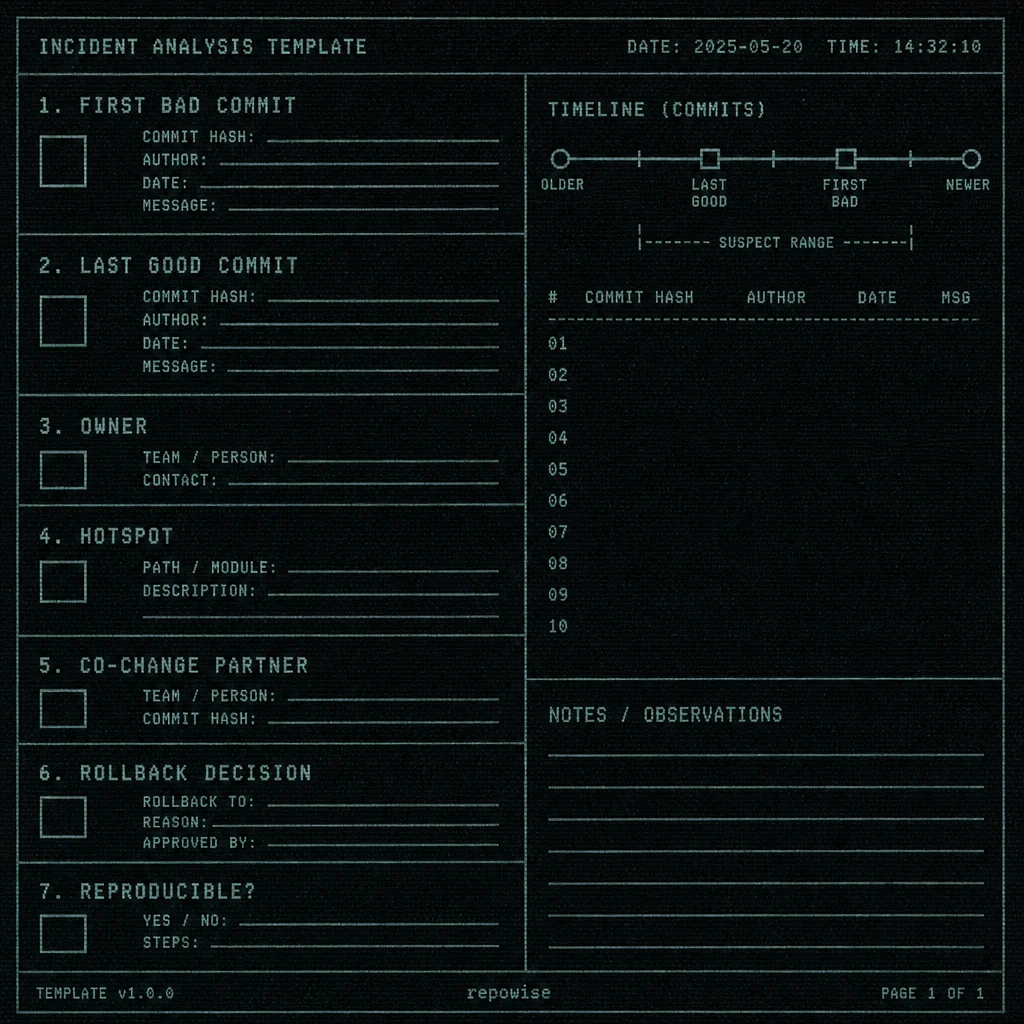
Keep a one-page incident template with these fields:
- service
- first bad deploy
- last good deploy
- suspect files
- owner
- commit range
- reproduction steps
- rollback decision
- final root cause
Then wire that template into your repo intelligence layer so the same questions can be answered from the codebase next time. That is the real payoff of who changed this code: fewer minutes lost at minute zero, and a rollback decision based on evidence instead of guesswork.
Try repowise on your own repo: the MCP server is configured automatically, or get started with pip install repowise && repowise init.
FAQ
How do I find who changed this code during an incident?
Start from the first bad deploy, not the code editor. Then use `git bisect` if the bug is reproducible, or inspect recent diffs plus ownership and hotspot data if it is not. `git blame` can help identify the last editor of a line, but it does not prove causality. ([git-scm.com](https://git-scm.com/docs/git-bisect/2.50.0.html))
Is git blame enough for incident root cause?
No. `git blame` answers who last touched a line. It does not tell you whether that change caused the failure. For incident root cause, you want commit-range evidence, related file history, and a reproducible pass/fail test where possible. ([git-scm.com](https://git-scm.com/docs/git-blame/fr))
When should I use git bisect in production incidents?
Use it when the bug is reproducible and you can test each revision quickly. Git’s bisect workflow is designed to find the commit that introduced a bug through binary search over history. If the failure depends on live traffic or timing, pair it with deploy-time evidence and recent-change review. ([git-scm.com](https://git-scm.com/docs/git-bisect/2.50.0.html))
What should I inspect before making a rollback decision?
Check the first bad deploy, the last good deploy, the exact files changed, and whether the change touched shared helpers, schema code, or cross-service boundaries. Also check whether the code path is a hotspot or has a low bus factor. Those signals tell you whether rollback is likely to be safe, as described on repowise's [architecture page](/architecture).
How do ownership maps help find the incident root cause?
Ownership maps do not prove the bug, but they tell you who knows the code and which files have concentrated knowledge. In a live incident, that helps you find the right person faster and reduces the time spent guessing at unfamiliar modules, per repowise's [architecture page](/architecture).
Can MCP tools help during incident response?
Yes. MCP gives you a structured way to ask for repo context, dependency paths, risk, and decisions from an AI-aware client. The official specification defines the protocol and transport behavior, which makes the tool interface more consistent than ad hoc chat over raw text. ([modelcontextprotocol.io](https://modelcontextprotocol.io/specification))