Repowise PR Bot

Know what a pull request breaks before you merge it.

On every pull request, the bot names the callers a change breaks, the files that usually change with it, the tests to run first and who to ask. Full AI review goes further and posts each confirmed point on the line it cites.

Free on public repositories, no account needed. It never runs your code.

Review modes

Three levels of review, chosen per repository.

Pick a mode per repository in your settings. The AI modes are paid from the plan's credits, and each repository has a monthly AI spend limit, $5 by default. When it is reached the bot posts the free Signals comment and notes the pause.

Full AI review

Pro and Teams

About 10 cents a push

Every pull request

Reads the diff and the code around it: callers, importers and definitions across the repository. A separate check confirms each point against the lines it cites, and each confirmed point posts as its own thread on that line.

repowise-botbotcommented on Sep 27
tool_change_risk.py:228

P1 · String paths become character patterns

The documented comma-separated string form is converted with tuple(...), producing one pattern per character instead of one pattern per path. The health comparison therefore usually matches no files and reports an empty or unavailable scoped result. Normalize a string by splitting on commas and trimming entries before constructing the tuple.

Checked: When include_paths is a comma-separated string, tuple(include_paths or ()) yields one character per tuple element, so the inclusion matcher receives invalid patterns rather than the documented paths.

Prompt for your agent

A real review thread on the diff of repowise-dev/repowise #2621

Its report page shows the lookups the review made and the signals it set aside, each with a reason. A clean pull request gets one line: "Reviewed the whole diff: nothing to fix."

Turn on Full AI review with Pro
AI triage

Pro and Teams

About 2 cents a push

Only when a signal fired

One model pass turns the signals that fired into review prose and keeps the ones that matter. A quiet pull request costs nothing.

repowise-botbotcommented on Sep 26

intelligence.py:141 This new callers/callees path has no test file importing intelligence.py. Add endpoint tests covering a callers-only request (no callees returned), a callees-only request (no callers returned), and an edge_types filter that excludes non-matching groups; assert both the returned groups and the corresponding totals.

✅ Health of changed files: 1.8 → 6.2 (+4.4)

A real comment, footer trimmed, on repowise-dev/repowise #2604

The missing-test signal, written as a review point.

Signals

Free on public repositories

No model, no credits

Only when there is something to act on

Built from the index of your repository, so the same diff always gets the same comment and no line of your code goes to a model.

repowise-botbotcommented on Sep 26

🔍 2 things to check

  1. 2 files that usually change with this PR's files are not in it: packages/core/src/repowise/core/ingestion/models.py, packages/core/src/repowise/core/ingestion/parser.py
  2. Run .../parser/test_cobol.py, .../ingestion/test_bare_name_index_kinds.py, .../ingestion/test_call_resolver_strategies.py first: they import the changed files

✅ Health of changed files: 2.1 (unchanged)

A real comment, footer trimmed, on repowise-dev/repowise #2609

Two signals fired, so it spoke. A pull request with none gets no comment.

What Signals catches

The things a reviewer cannot see in the diff.

A diff shows what changed. It does not show who calls it, what usually changes with it, or which tests cover it. Signals reads that from the index of your repository, with no model involved, and puts it on the PR.
  1. Callers a change breaks

    When a pull request changes a function's signature, the bot names the callers outside the pull request, with the full list on the report page. Symbol level, not file level, so a body-only edit stays quiet.

    mark_tombstone_pages in .../pipeline/persist.py signature changed. Called by 9 symbols outside this PR: .../update_cmd/persistence.py::_persist_full_update_async, .../pipeline/test_tombstone_fts_removal.py::test_a_renamed_file_is_dropped_under_its_old_path, .../pipeline/test_tombstone_fts_removal.py::test_a_tombstoned_page_is_deleted_from_the_full_text_index (+6 more)

    From a real comment on repowise-dev/repowise #1204

  2. Files that usually change together

    Git history knows which files move as a pair. When one of them is missing from a pull request, the bot names it, and when it is one file, how often they changed together.

    .../perf/dialects/python.py changed with .../perf/dialects/ts_js.py in 11 past commits and is not in this PR

    From a real comment on repowise-dev/repowise #2599

  3. Tests to run first

    The test files that import what changed, found from the import graph, so a reviewer knows which suites matter for this diff.

    Run .../parser/test_cobol.py, .../ingestion/test_bare_name_index_kinds.py, … first: they import the changed files

    From a real comment on repowise-dev/repowise #2609

  4. Safe moves and who to ask

    A refactor that only moves code says so in one line, so nobody hunts for breakage that is not there. The people who own the risky files are suggested as reviewers.

    ↪️ 15 symbols moved from parser_helpers.py to type_heads.py; … No caller has to change.

    👀 Suggested reviewers @Laex

    From a real comment on repowise-dev/repowise #2584

Also in the comment when it matters: the health change of the files you touched, hotspots, new findings and dead code, and, with the merge gate on, whether AI-written or human-written files drove a change. Everything that is context and not a decision sits behind one fold.

Merge gate and controls

Gate the merge when you are ready.

The gate is off by default, because a bot that fails your build on day one gets uninstalled on day one. Configure it in your settings or in a .repowise/bot.yaml in the repository.

A check that can block the merge
Turn on the Repowise code health check as advisory, or blocking with a rule such as fail when repository health drops, or fail when the PR adds new findings. Branch protection can require it like any other check.
Findings on the lines
Off by default. Turn it on and changed signatures with outside callers and high and critical new findings are marked on the diff. Full AI review points also show as check annotations.
Threads that close themselves
When a later push changes the lines a Full AI review point quoted, the bot replies on that thread and resolves it. Replies and thumbs on each point are recorded.
Labels, if you want them
Optional repowise: labels such as gate-failed or missing-tests, kept in sync on every push.
Quiet when you ask
Add [skip repowise] to a PR title to skip one pull request. Comment /repowise recheck to run it again. Ignore generated or vendored paths per repository.

Coverage gates in CI

Fail the pull request its tests did not cover.

The Repowise GitHub Action and GitLab template judge a change on the lines it adds, never on the repository's past. They are open source and need no account, index or API key.
Patch coverage
Fails the change when its tests ran fewer of the changed lines than your minimum. A change with only a few executable lines is reported, never failed.
Path-scoped gates
A stricter floor for services/api than for scripts, set in .repowise/config.yaml. repowise coverage suggest-gates proposes gates from CODEOWNERS and your top-level packages.
Risk-weighted gating
A higher minimum over the risky files alone, the hotspots and the files that keep needing fixes. A separate gate fails a change bigger and more spread out than a percentile of your recent commits, 95 for example.
Coverage trend
Give it a report from the base commit and it shows how project coverage moved, and can fail a drop of more than the points you allow.

With a coverage upload, the bot's checks comment and the PR report show patch coverage and the uncovered ranges of each file, and Repowise / coverage can be a required check. The bot can open a draft pull request that adds the upload workflow for you.

GitHub Actions, after your tests write the report
- uses: repowise-dev/repowise@v0.54.0
  with:
    checks: coverage,risk
    coverage-report: coverage/lcov.info
    coverage-fail-under: 80
    coverage-fail-under-risky: 90
    risk-fail-above-percentile: 95
GitLab, .gitlab-ci.yml
include:
  - remote: https://raw.githubusercontent.com/repowise-dev/repowise/main/ci/gitlab/repowise.gitlab-ci.yml

variables:
  REPOWISE_COVERAGE_REPORT: coverage/lcov.info
  REPOWISE_COVERAGE_FAIL_UNDER: "80"

Every PR gets a page

The comment stays short. The page has everything.

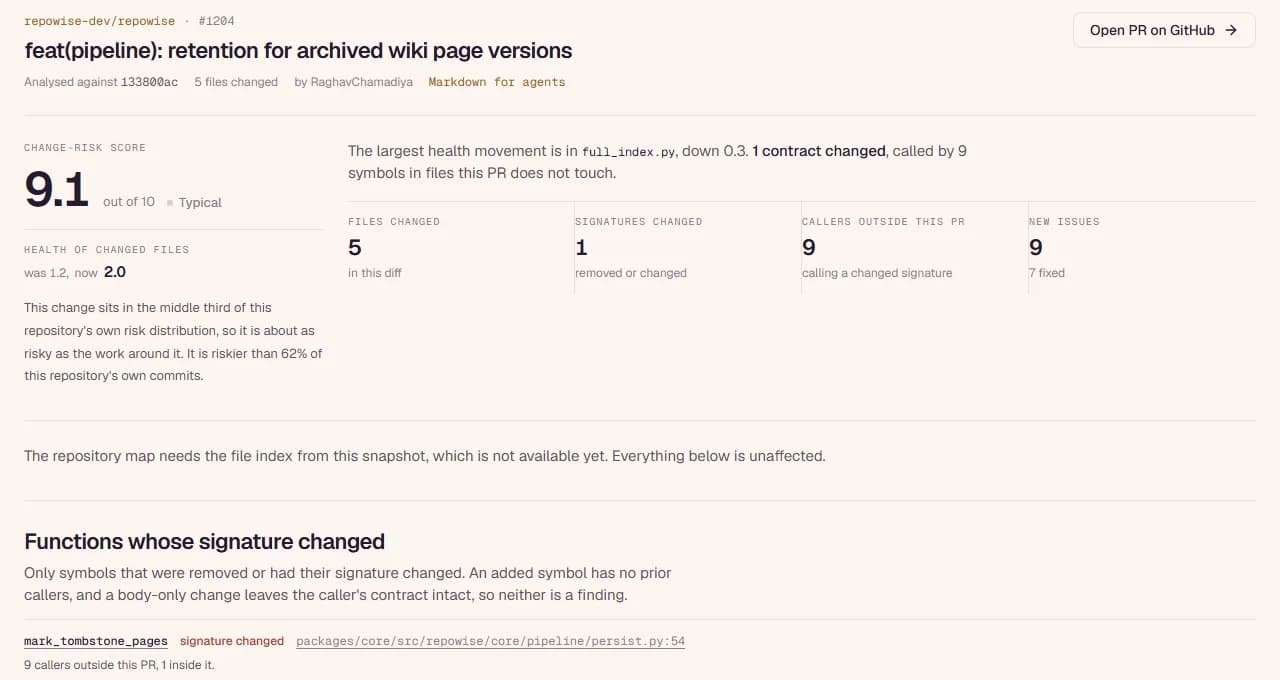
Each comment links to a public report for that pull request: every caller of a changed contract, health before and after, the change-risk score, the tests that guard the change, and for an AI review, the pass that ran and the points the check withheld. No sign-in, so anyone on the PR can open it. A plain-text version is there for coding agents.

Open this report
The Repowise report for repowise-dev/repowise pull request 1204: change-risk score 9.1, one changed signature called by nine symbols outside the PR, and the list of those callers.
repowise.dev/pr/repowise-dev/repowise/1204, captured Sep 27, 2026

Security

Reads your code. Never runs it.

  • It cannot merge. It writes comments and, if you ask, a check and labels. The one file change it can make is the coverage setup pull request, opened as a draft for you to review.
  • In Signals mode no line of your code goes to a model, because there is no model.
  • AI review runs only on repositories where you turn it on in your settings. A repository file cannot switch it on or raise its cap, so a fork cannot turn paid review on. Once on, it reviews every pull request, forks included, within the monthly cap.

GitHub permissions requested

Contents
Read. Write only for the one-click coverage setup
Metadata
Read
Pull requests
Write, to comment
Issues
Write, because GitHub stores PR comments as issue comments
Checks
Write, only if you turn on the merge gate or findings on lines
Workflows
Write, only for the one-click coverage setup

Pricing

Start free. Turn on Full AI review with Pro.

Install free and Signals runs on every public repository. Pro adds private repositories and the AI modes, paid from credits the plan includes, with a spend limit on every repository.

Free

$0

Public repositories

  • Signals on every public repository, no PR cap
  • The merge gate and findings on lines
  • A public report for every pull request
  • No model runs and no credits are spent

Pro

$15 a month

or $12 a month billed yearly

  • Everything in Free, on private repositories too
  • Full AI review, about 10 cents a push
  • AI triage, about 2 cents a push
  • $5 of AI credits a month included, about 50 full reviews
  • A monthly AI spend limit per repository, $5 by default

Teams

$20 a seat a month

From 3 seats

  • Everything in Pro, across the team's repositories
  • One organization install for every member
  • A shared credit pool, $5 a seat a month
  • A $100 a day AI spend cap for the team

FREQUENTLY ASKED

Questions teams ask first

Does it comment on every pull request?

No. In Signals mode, the default, a pull request with nothing to act on gets no comment. Full AI review, on Pro or Teams, reviews every pull request and posts one line on a clean one.

Does it run a model on Free?

No. On Free the bot runs Signals only: the comment comes from an index of your repository, built from parsed code, the call graph, git history and a 25-marker health scorer. A model runs only for AI triage or Full AI review, on Pro or Teams, on repositories where you turn it on.

What does a full review cost?

About 10 cents a push, paid from credits. Pro includes $5 of credits a month, about 50 full reviews, and each repository has a monthly AI spend limit, $5 by default. When the limit or the balance runs out, the bot posts the free Signals comment and says the AI pass is paused.

Can it gate on test coverage?

Yes. Upload a coverage report from CI and the bot's Repowise / coverage check fails a pull request below your patch coverage minimum. The Repowise GitHub Action and GitLab template run the same gate in your own pipeline, with path-scoped and risk-weighted gates, and need no account or API key.

Do I need a Repowise account?

Not on public repositories. Install the GitHub App and the bot comments on their pull requests. Sign in with GitHub to choose a review mode, turn on the merge gate, or add private repositories, which need Pro.

Which languages does it understand?

The same languages the Repowise index parses, including Python, TypeScript and JavaScript, Go, Java, Kotlin, C#, Rust, C and C++, Ruby, PHP and Swift, among about 40. The co-change and ownership signals come from git history and work for any file.

How is this different from an AI code reviewer?

An AI reviewer reads the diff. Repowise also knows the rest of the repository: who calls a changed function, which files history says belong together, and which tests import the change. That evidence is there for free, without a model, and the AI modes build on it instead of guessing.

Is GitHub the only host?

For the bot, yes, today. It is a GitHub App and works on public, private and organization repositories. The CI gates also run on GitLab through the Repowise template.

Can I turn it off for one pull request or one path?

Put [skip repowise] in the pull request title to skip it. Ignore paths such as vendor/ or generated files per repository in your settings or .repowise/bot.yaml.

How do I uninstall it?

On GitHub: your account's Settings, Applications, Installed GitHub Apps, or your organization's Settings, GitHub Apps. Uninstalling removes its access at once.

Install it on the repository you are working on today.

Free on public repositories. Your next pull request shows you what it does.