On this page
- What an EM should be able to see in 60 seconds
- The four risk lenses
- Bus factor
- Hotspot density
- Untested hotspots
- Stale ownership
- 1. repowise health + ownership views
- Best for
- Weak spots
- What I would use it for
- 2. CodeScene
- Best for
- Tradeoff
- 3. LinearB / DX
- Best for
- Weak spot
- My take
- 4. Jellyfish
- Best for
- Weak spot
- 5. Pluralsight Flow
- Best for
- Weak spot
- Comparison: dev visibility vs people analytics
- How I would choose
- Pick repowise if:
- Pick CodeScene if:
- Pick LinearB, DX, Jellyfish, or Flow if:
- A weekly EM review checklist
- FAQ
- What is the best tool for engineering manager codebase tools?
- What should a code risk dashboard show?
- Are engineering visibility tools and tech lead dashboards the same thing?
- Is bus factor enough to assess code risk?
- Is MCP relevant for EM dashboards?
- Should I choose a people analytics platform or a code intelligence platform first?
Engineering manager codebase tools are only useful if they answer three questions fast: where is risk concentrated, who owns it, and what breaks if one person disappears. Most dashboards stop at activity. The better ones show code health, ownership, dependency shape, and change history in one place. That matters for a weekly review, a staffing decision, and a release freeze. This post compares the main options for codebase risk assessment, with a bias toward tools that help an EM act in under a minute, not just admire charts.
What an EM should be able to see in 60 seconds
A good code risk dashboard should answer these questions without clicking through five screens:
- Which parts of the codebase are most fragile.
- Which parts are changing the most.
- Who knows those parts.
- Which risky areas have weak test coverage or stale ownership.
- What changed since last week.
If you can’t get those answers quickly, the tool is probably optimized for reporting, not for engineering management. That is the core split in engineering visibility tools: some are built for codebase intelligence, others for people analytics and portfolio reporting.
For repo-level risk, the useful output is usually a compact set of objects:
- a hotspot list,
- an ownership map,
- a dependency graph,
- a health score by file or module,
- and an alert when a risky area gets touched again.
repowise ships those as generated docs, git intelligence, dependency graphs, and health signals, exposed through MCP tools that AI agents can query directly. The platform overview and examples are easiest to understand from the architecture page and the live examples. For a quick first look, the FastAPI dependency graph demo and the hotspot analysis demo show the kind of view an EM should expect.
The four risk lenses
Bus factor
Bus factor is the practical question: how many people can safely edit this part of the system?
A useful tool does more than list “owners.” It should show:
- named contributors,
- recent commit activity,
- whether ownership is concentrated in one or two people,
- and whether those people still touch the code.
CodeScene calls this out directly through knowledge distribution and bus-factor-style analysis in its product material. That is a strong signal because it ties code ownership to operational risk, not just org charts. (codescene.com)
Hotspot density
Hotspot density is where churn meets complexity. A file that changes often is not automatically risky. A file that changes often and already has structural debt is where incidents and slowdowns start.
CodeScene’s product pages describe hotspots as the overlap of frequent change and low code health, which is the right framing for EMs because it points to where refactoring pays back. (codescene.com)
Untested hotspots
Untested hotspots are the worst mix:
- frequently changed,
- structurally weak,
- and poorly covered by tests.
That is the area where a small patch can spread risk across a release train. A serious code risk dashboard should mark these explicitly. If the tool only reports cycle time or PR throughput, you won’t see this class of problem until the incident postmortem.
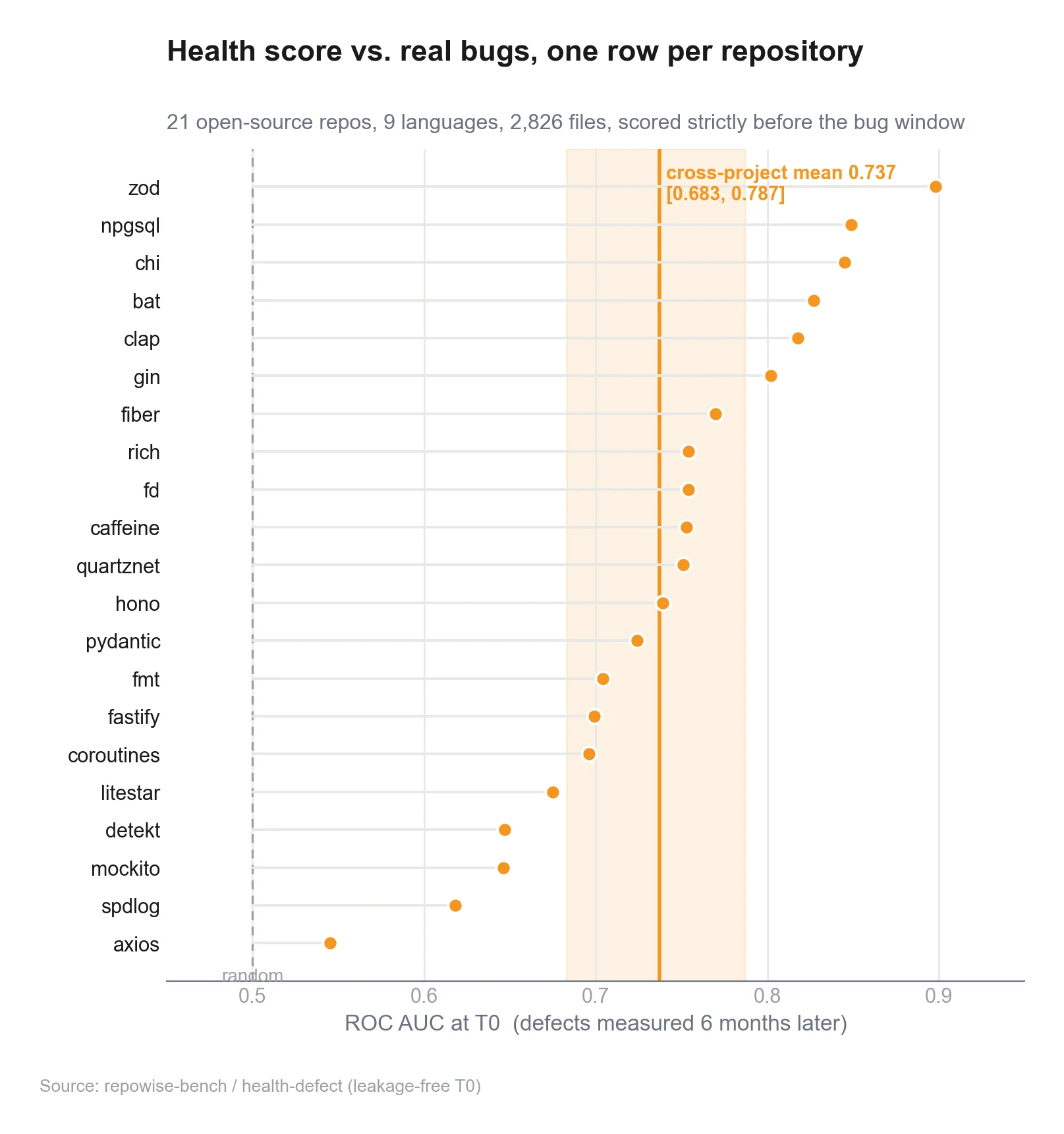
repowise's code health layer covers this directly, including untested-hotspot detection and ranked refactoring targets, scored across three co-equal signals (defect risk, maintainability, and performance) rather than one blended number. That is useful because it turns a vague “this file feels bad” into a ranked queue of work. You can see how the system is put together on repowise’s architecture and how it behaves on real repos in the FastAPI docs demo.
Stale ownership
Stale ownership means the name on the wiki does not match the people still doing the work.
This shows up when:
- a module was last refactored two quarters ago,
- the “owner” no longer contributes there,
- and the team has moved on without reassigning responsibility.
Tools that mine git history can surface this quickly. Tools that only read team metadata usually miss it. For EMs, stale ownership is a quiet risk because it often sits just below the threshold of visibility until an outage or a major refactor forces the issue.
1. repowise health + ownership views
repowise is the strongest fit when the question is codebase risk assessment inside a real repository. It is open source, self-hostable, and licensed under the GNU AGPL v3, which matters if you want to run it in your own environment and keep the control plane close to your code. The platform also exposes its data through the Model Context Protocol specification, so agents can ask structured questions instead of scraping screenshots. (gnu.org)
What makes it different is the combination:
- auto-generated docs for every file, module, and symbol,
- git intelligence for ownership, hotspots, co-change, and bus factor,
- dependency graphs across 16 languages,
- and ten flagship MCP tools for structured retrieval.
That mix is useful for an EM because it replaces three separate tabs:
- “What does this module do?”
- “Who owns it?”
- “Why is it risky?”
Two of those ten tools are built specifically for the risk questions this post is about. get_risk supports a PR mode: pass it the changed files in a pull request and it returns a directive block naming what the change is likely to break, which co-change partners are missing from the diff, and which tests actually cover the touched code. get_change_risk goes a step further and scores the defect risk of an entire commit or a base..head range from the shape of the diff itself, before merge, so an EM can see which pull requests are statistically riskier before anyone reviews a line. That is a direct answer to “what breaks if one person disappears” and “what should I look at before I approve this,” which is the exact gap this post is scoping.
If you want a concrete output, the auto-generated docs for FastAPI show the level of detail repowise can produce on a real codebase.
Best for
- EMs who need repo-level risk, not just team metrics.
- orgs that want self-hosted visibility.
- teams that want AI agents to read the same code intelligence humans see.
Weak spots
- It is codebase-first, so it will not replace a people-ops dashboard.
- It is most valuable when you actually want to act on the signals, not just file monthly reports.
What I would use it for
- weekly risk review,
- ownership checks before a re-org,
- hotspot triage before planning,
- and release-readiness review for fragile modules.
2. CodeScene
CodeScene is still the clearest pure-play tool for code health and hotspot analysis. Its product pages emphasize code health, hotspot analysis, knowledge distribution, and bus-factor-style planning. It also presents code health as a file-level metric and ties hotspots to change frequency, which is exactly the combination EMs need. (codescene.com)
The main reason CodeScene stays on this list is focus. It does one job well: make hidden code risk visible and rank where to spend engineering time. That is why many teams use it as the reference point for hotspot-driven refactoring. Its current pricing page also shows that the product now includes IDE-side CodeHealth guidance and local quality gates, which pushes the signal closer to the developer workflow. (codescene.com) For a line-by-line look at where repowise and CodeScene diverge, see the CodeScene alternative page.
Best for
- hotspot analysis,
- code health scoring,
- code-level prioritization,
- and ownership-risk discussions.
Tradeoff
- It is strong on code intelligence, lighter on org-wide people analytics.
- If you want portfolio views across many teams, you may need another layer above it.
3. LinearB / DX
LinearB and DX tend to sit closer to engineering operations than to code-risk inspection. LinearB describes its metrics program as a way to provide visibility into engineering health, delivery, and developer experience. That is useful, but it is not the same thing as seeing which files are at risk. (linearb.io)
DX is usually positioned around engineering productivity and developer experience. That category helps leaders understand flow, but it often stops short of showing the actual code artifacts that create risk. For an EM, that distinction matters. A dashboard can tell you teams are slow. It cannot always tell you which module will hurt you next.
Best for
- process visibility,
- DORA-style reporting,
- engineering throughput,
- and leadership readouts.
Weak spot
- weaker on file-level risk, dependency shape, and ownership concentration.
My take
If your question is “how healthy is engineering?”, these tools help. If your question is “where is the next brittle module?”, they are not usually enough on their own.
4. Jellyfish
Jellyfish is built as an engineering intelligence platform with capacity planning, risk alerts, and scenario modeling. That makes it valuable for budget and portfolio decisions. Its own positioning emphasizes planning with real capacity data and early risk alerts. (jellyfish.co)
That makes Jellyfish strong for:
- staffing conversations,
- investment planning,
- and exec-level engineering oversight.
It is less obviously a codebase risk assessment tool in the CodeScene sense. It can tell you where the organization is under strain. It does not always show you the exact file or module graph behind that strain.
Best for
- capacity planning,
- budget conversations,
- portfolio visibility,
- and leadership reporting.
Weak spot
- not the first tool I’d pick for module-level code risk or ownership analysis.
5. Pluralsight Flow
Pluralsight Flow is historically about activity and delivery analytics. Its product material highlights historical Git data, commits, PRs, and metrics such as lead time and time to first comment. That is useful for process trends and team cadence. (pluralsight.com)
Flow helps answer questions like:
- Are teams getting bogged down?
- Is review taking too long?
- Are changes flowing through the system?
What it usually does not answer by itself is:
- Which module is fragile?
- Which file has the worst change-to-debt profile?
- Which owner map has gone stale?
Best for
- delivery metrics,
- code review flow,
- and team-level trend analysis.
Weak spot
- less direct support for code-risk dashboard use cases.
Comparison: dev visibility vs people analytics
A lot of buyers mix these up. They are related, but they are not the same product class.
| Tool class | Main question | Typical outputs | Best use |
|---|---|---|---|
| Code intelligence | What code is risky, and why? | hotspots, health scores, ownership maps, dependency graphs | refactoring, incident prevention, release readiness |
| Engineering analytics | How is delivery flowing? | cycle time, PR throughput, review latency | process improvement, team cadence |
| People / portfolio analytics | Where is the org constrained? | capacity, staffing, investment scenarios | planning, budget, headcount |
Scroll the table sideways to see every column.
If you are an EM, you probably need the first class first. You can’t fix what you can’t point to. A tech lead dashboard that shows velocity without code shape can miss the module that everyone avoids touching. A people-analytics platform can tell you a squad is overloaded, but not which dependency chain makes the work painful.
That is where tools like repowise and CodeScene stand apart. They are closer to the code itself. repowise makes that data queryable through MCP, which matters if you want to plug the intelligence into agents or a workflow you already have. The MCP spec exists to standardize those tool connections, and the current spec makes structured client-server interaction a first-class part of the protocol. (modelcontextprotocol.io)
How I would choose
Pick repowise if:
- You want self-hosted codebase intelligence.
- You care about file, module, and symbol context.
- You want ownership, dependency, and health data in one place.
- You want AI agents to use the same signals humans use.
Pick CodeScene if:
- You want the most mature hotspot-first code health workflow.
- You need a focused tool for technical-debt prioritization.
- You want an established code-intelligence product with deep code-health messaging. (codescene.com)
Pick LinearB, DX, Jellyfish, or Flow if:
- Your primary pain is reporting and delivery visibility.
- Your leadership wants org-wide engineering telemetry.
- You need team-level or portfolio-level trend analysis more than file-level risk.
A weekly EM review checklist
Use this every Monday or before planning.
-
Check the top five hotspots.
Look for churn plus low health. If the same area keeps appearing, stop treating it as background noise. -
Review ownership drift.
Ask whether the named owner still works in the area and whether the module has a second person who can safely change it. -
Scan for untested hotspots.
Prioritize code that is both fragile and frequently changed. -
Look at dependency paths.
A module is riskier if many paths depend on it. Small edits can have large blast radius. -
Compare this week to last week.
Risk that is stable is one thing. Risk that is rising needs action. -
Decide one action.
Rename an owner, add tests, split a module, or schedule a refactor.
If you want a practical starting point, the ownership map for Starlette shows how git intelligence can make stale ownership visible, and the live examples page is a fast way to compare outputs on real repos.
 Weekly Code Risk Review
 Ownership and Bus Factor View
 Hotspot and Test Coverage View
FAQ
What is the best tool for engineering manager codebase tools?
If you want file-level risk and ownership, start with a code-intelligence tool like repowise or CodeScene. If you want org-level delivery reporting, add a people or engineering-analytics platform on top.
What should a code risk dashboard show?
At minimum: hotspots, ownership, dependency paths, and test coverage around frequently changed code. If it can’t answer those four, it is missing the core of codebase risk assessment.
Are engineering visibility tools and tech lead dashboards the same thing?
No. A tech lead dashboard often emphasizes delivery flow and review status. Engineering visibility tools can include code health, dependency risk, ownership drift, and team-level metrics. The useful ones include both, but the code view is the part EMs usually need first.
Is bus factor enough to assess code risk?
No. Bus factor is only one lens. You also need hotspot density, untested hotspots, and stale ownership. A module with many owners can still be risky if it changes constantly and has poor test coverage.
Is MCP relevant for EM dashboards?
Yes, if you want agents or internal tools to query code intelligence in a structured way. The current MCP spec is built for client-server tool access, which makes it a good fit for repository intelligence exposed to assistants. (modelcontextprotocol.io)
Should I choose a people analytics platform or a code intelligence platform first?
If your pain is “we do not know where the code risk is,” choose code intelligence first. If your pain is “we do not know how engineering capacity is allocated across the org,” start with people analytics. Most EMs eventually need both, but they solve different problems.
If you want to try this on a real repo, get started with pip install repowise && repowise init, or see how it behaves on a codebase through the live examples and FastAPI hotspots demo.