On this page
To find untested hotspots, rank files by how often they change, how many files depend on them and how little of them your tests run, then write tests for the top of that list. With repowise the check is repowise coverage add coverage.lcov followed by repowise health, which flags a file as an untested_hotspot when it has 8 or more commits in 90 days, at least 4 dependents and line coverage below 40%. Without it, git log, an lcov report and a dependency count give you the same ranking by hand.
Part of the code health guide.
Why overall coverage is the wrong thing to chase
A coverage percentage measures how much code ran during tests, not whether the right code is protected. A repository at 82% can still have no test on the file that routes payments, because that file is a small share of the total lines.
coverage.py reports line and branch coverage, and SonarQube imports coverage reports from external tools instead of computing them. Both treat coverage as an input to a decision. The decision needs three more facts:
- Churn. Which files do people keep editing?
- Dependents. How many files break if this one is wrong?
- Coverage. How much of the file do tests run today?
A file that is bad on all three is the one to test first. A file nobody touches and nobody imports can stay at 0% for years without costing you anything.
What is an untested hotspot?
An untested hotspot is a file that changes frequently, is depended on by many other files, and has little or no test coverage. It usually starts as a thin handler. It gains branches, more callers import it, and the tests stay behind in the shape the file had a year ago.
repowise turns that definition into a rule. The untested_hotspot finding fires only when a file is all three of:
| Condition | Threshold |
|---|---|
| A hotspot | Flagged by the git layer: 8 or more commits in 90 days, or a hotspot score of 0.8 or more |
| Depended on | At least 4 dependents |
| Under-tested | Line coverage below 40% |
Scroll the table sideways to see every column.
Severity is CRITICAL at 15% coverage or less with 10 or more dependents, HIGH when one of those two holds, and MEDIUM otherwise. Thin-but-present coverage is a separate finding, coverage_gap. Source: the test intelligence layer (release 0.56).
With no coverage report ingested, repowise flags the file only when nothing says a test touches it: no test file paired by name and no test reaching it in the dependency graph. That keeps the finding quiet on repositories that have not measured coverage yet.
How to find untested hotspots by hand
You can build the ranking with git, an lcov report and a dependency count. It is worth doing once on a small repository to see what the signal looks like.
Produce a report. For Python:
pytest --cov --cov-report=lcov:coverage.lcov
Count edits to a candidate file over 90 days:
git log --since="90 days ago" --name-only --pretty=format: -- src/billing/invoice.py | grep -c .
Rank every file by edits in one pass:
git log --since="90 days ago" --name-only --pretty=format: \
  | grep -v '^$' | sort | uniq -c | sort -rn | head -20
Then list per-file coverage and look up the top files:
lcov --list coverage.lcov
Finally count dependents. In a JavaScript or TypeScript repository, grep -rl "from './invoice'" src | wc -l is a rough first pass. Intersect the lists: files high in churn, with many importers and low coverage, are your candidates. The weak point of the manual route is dependents, because grep misses re-exports and aliased imports. A dependency graph does not.
How to find them with repowise
repowise coverage add ingests a report and repowise health lights up the untested hotspots, with no LLM key and no network. The graph and git history are already in the index, so the ranking is a lookup.
uv tool install repowise
repowise init
pytest --cov --cov-report=lcov:coverage.lcov
repowise coverage add coverage.lcov
repowise coverage status
repowise health
coverage status summarizes what was read:
Coverage (lcov)
  Files:  412
  Lines:  71.4%
  Branch: 63.9%
repowise reads LCOV, Cobertura, Clover, JaCoCo, Go coverprofile, coverage.py .coverage files and a normalized JSON format, and auto-discovers the usual report locations when you pass no path. Report paths are matched to indexed files by exact path, then by the longest matching tail, and an ambiguous match is reported, never guessed.
In the dashboard, coverage is the Tests tab of a repository's health page. The chart below plots every instrumented file by health score and line coverage, sized by lines of code. The top-left region is the one to work through first: files the health layer scores as weak with little test protection.
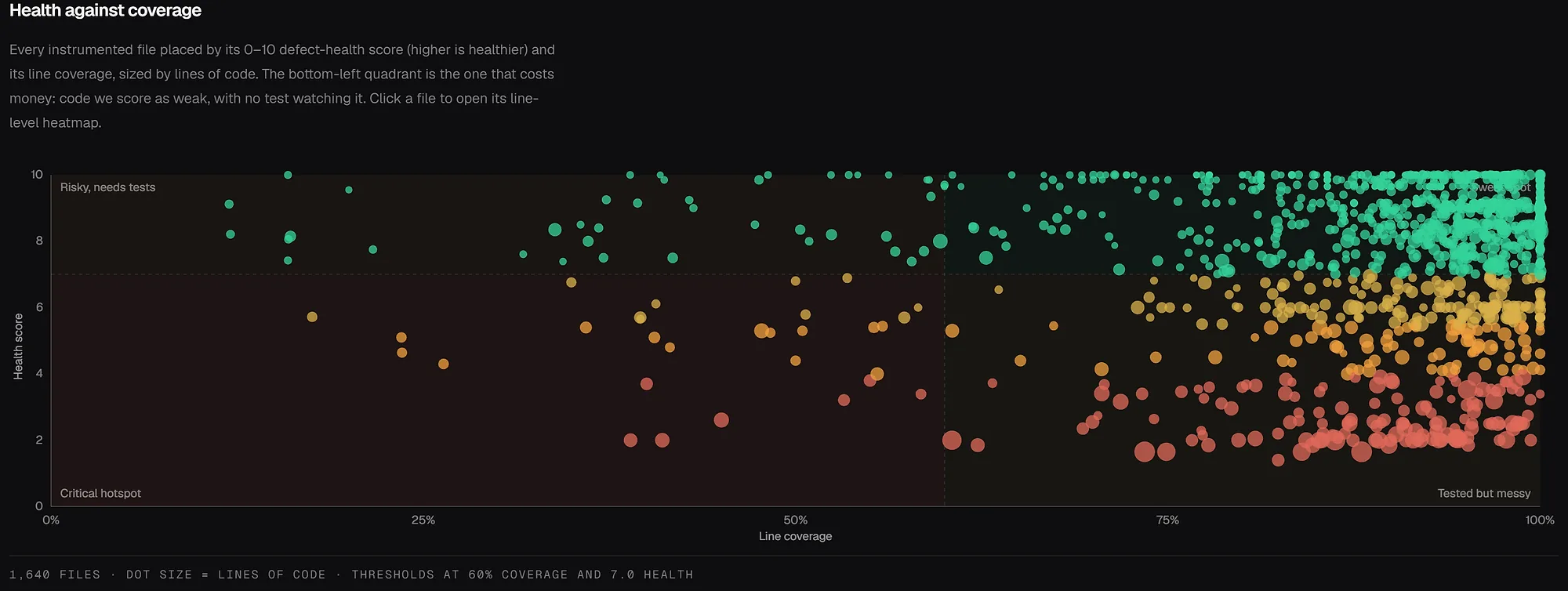
To see the ranking on a public codebase before installing anything, open the FastAPI code health view or browse the live example repositories. For the hotspot signal on its own, see git hotspot analysis for risky files.
Measured and inferred coverage
repowise labels every coverage answer as measured or inferred, and never turns an inferred answer into a percentage. Measured means a report says a test ran these lines. Inferred means the call and import graph shows a test reaching the file.
This matters for untested hotspots because a filename convention fails both ways. On the repowise repository, five of the six worst bug-magnet files have no test named for them, yet 3 to 23 test files reach each one in the graph. Judging by name alone would have called them untested.
repowise measured the inferred tier against a real coverage run --contexts=test on a slice of its own repository with full per-test attribution (37 test files, 159 production files). The "what reaches this file" check, which suppresses a false untested_hotspot, had 95.7% precision. The "which tests do I run" selection had 97.5% precision.
What to do when you find one
Write the narrowest test that proves the risky behavior, then refactor. A broad integration test is expensive and fails for reasons that hide the cause.
- Cover the branch, not the file. If the hotspot has one risky conditional, test both paths.
- Pin the contract at the boundary. Assert inputs and outputs at the file's edge, and mock the rest only to keep the test stable.
- Freeze every past bug. If the file already broke once, write the regression test for that bug first.
- Test co-change partners together. Two files that keep changing in one commit usually encode one behavior in two places. See hidden coupling and co-change detection.
- Refactor after the test lands. The test is what makes the next edit safe.
If the file turns out to be unreachable, delete it instead. Finding dead code is the cheaper way to remove a hotspot.
To check a fix, re-ingest and look at the lines you touched:
repowise coverage add coverage.lcov
repowise impacted-tests main...HEAD
impacted-tests lists the tests whose recorded coverage touches the changed lines, so you can see that the new test guards the change.
Keeping the list honest in CI
Gate pull requests on patch coverage, the share of changed lines your tests ran, instead of a global percentage. A global gate is easy to game and hides where the risk is. A patch gate asks whether this change is tested.
repowise coverage check origin/main...HEAD --report coverage/lcov.info --fail-under 80
The command needs only git and a report: no index, no ingest, no LLM key. It exits 0 when the change passes or has nothing to judge, 1 when it falls below the gate, and 2 when the check could not run. A new file no test loaded is listed as not_in_report, never counted as 0%. With an index, each uncovered range names the test file to extend.
You can scope gates by path (a stricter gate for services/api) and weight them by risk. The CI guide has the GitHub Action, the GitLab template and per-language report commands. repowise coverage suggest-gates proposes the configuration for your repository and writes nothing.
From an AI agent
An agent can ask repowise which tests guard a change and whether the lines it just wrote are covered. get_risk(changed_files=[...], include=["tests"]) returns up to ten recommended tests, each labelled measured or inferred. get_change_risk returns impacted_tests and a patch_coverage block, and an empty test list there never means "untested": every status other than selected reports run_all: true. These are two of repowise's ten MCP tools; see the MCP tools reference.
FAQ
- What are untested hotspots?
- Untested hotspots are files with high change frequency, many dependents and low or no test coverage. repowise flags one as an
untested_hotspotwhen a file has 8 or more commits in 90 days (or a hotspot score of 0.8), at least 4 dependents and line coverage below 40%. - What should I test first in a large legacy repository?
- Start with the files that change most and that many other files import: authentication, billing, persistence, routing, migrations and shared helpers. A hot, depended-on file at low coverage beats a larger file that nobody edits.
- Is test coverage enough to find risk?
- No. Coverage shows what ran, not what is risky. Pair it with churn from
git log, a dependent count and, where available, branch coverage, which catches paths inside lines that executed. - How do I find coverage gaps without a platform?
- Generate an lcov report with your test runner, rank files by edits with
git log --name-only, and count importers with a dependency scan. Intersect the three lists. The manual route works on a small repository, and a dependency graph removes the guesswork about dependents. - Why does repowise use a 40% coverage threshold?
- It is a triage line in the
untested_hotspotrule, applied only to files that are also hot and widely depended on. Below it the file is missing most of its behavior. Files with some coverage but gaps fall under the separatecoverage_gapfinding. - Does repowise need an LLM key for this?
- No. Ingesting a coverage report is a parse and a database write, and every question after that is an index lookup. Patch-coverage gates need only git and a report.
- Which coverage formats does repowise read?
- LCOV, Cobertura, Clover, JaCoCo, Go coverprofile, coverage.py
.coveragedatabases and a normalized JSON format for any other runner. A.coveragefile or per-test LCOV also builds the per-test map that powersimpacted-tests. --- Next: how to prioritize technical debt by impact per effort for the ranking that decides which hotspot to fix after you test it.