On this page
The best dependency graph tool for a monorepo depends on which layer of the graph you need: Nx or Turborepo for the package graph that drives builds, Madge or dependency-cruiser for JavaScript and TypeScript import cycles and rules, and repowise for a file and symbol graph with history and change impact across 28 languages. Most teams end up with two of these, because a package graph and a code graph answer different questions.
The short list, as of October 2026:
- Nx: a project graph tied to affected commands, caching and CI.
- Turborepo: a package and task graph with low setup, for JavaScript and TypeScript.
- Madge: the fastest way to draw a module graph and list circular imports.
- dependency-cruiser: dependency rules you can fail CI on, plus graph output.
- Knip: the module graph used to find unused files, exports and dependencies.
- repowise: a file and symbol graph with ownership, churn and blast radius, readable by agents over MCP.
We build repowise, so weigh our entry accordingly. The measurements we publish about it, with their methods, are on the benchmarks page.
How we evaluated
We read each tool's own documentation and repository on 29 October 2026 and compared them on four things.
- Graph depth: packages and tasks, files and modules, or symbols (functions, classes, methods).
- Cycles: can it find a circular dependency, and can it forbid one?
- Languages: one ecosystem or many.
- What the graph is for: running tasks, enforcing rules, cleaning up, or understanding the code.
Comparison table
| Tool | Graph depth | Circular dependencies | Languages | Main job | License |
|---|---|---|---|---|---|
| Nx | Projects and tasks | Through enforced boundaries | TypeScript first; plugins for Gradle, Maven, .NET, Go and more | Affected tasks, caching, CI | MIT |
| Turborepo | Packages and tasks | Not its focus | JavaScript and TypeScript | Task pipelines and caching | MIT |
| Madge | Files and modules | --circular | JavaScript (AMD, CommonJS, ES modules), CSS preprocessors | Quick module graph | MIT |
| dependency-cruiser | Files and modules | Rules that fail the build | JavaScript, TypeScript, Vue, Svelte | Rule enforcement and graph output | MIT |
| Knip | Files and exports | Not its focus | JavaScript and TypeScript | Unused code and dependencies | ISC |
| repowise | Files and symbols, with 17 edge types | Break Cycle refactoring plans; cycles in the workspace architecture view | 28 languages parsed to a full AST | Understanding and change impact | AGPL-3.0 |
Scroll the table sideways to see every column.
Why package graphs are not enough
A package graph tells you which package depends on which, and that is the right level for build order, caching and release order. It stops there. It cannot say which function inside a package carries the risk, or which file closes a loop.
In a monorepo that gap matters because most architectural trouble lives below the package boundary: a shared utility that became a dumping ground, two modules that each import the other, one file that everything routes through. A graph that only shows package arrows treats all of that as one line.
So the first decision is the layer. Package level for orchestration, file level for cycles and boundaries, symbol level for refactors and change impact. The tools below sit at different layers, which is why they are rarely substitutes for each other.
1. Nx
Nx is a monorepo platform whose project graph decides which tasks run, what can be restored from cache and which projects a change affects. You open the graph with npx nx graph, and nx affected runs tasks only for the projects a change touches.
- Where it shines: a graph wired straight into CI behavior. Nx plugins discover tasks for Vite, Webpack, Jest, Gradle, Maven, .NET and Go, so the graph is not limited to JavaScript, and
npx nx initadds it to an existing npm, pnpm or yarn workspace (repository). - Granularity: projects and tasks. It models how workspace projects relate, not the symbols inside them.
- Pick it if you want the graph to drive affected builds, caching and boundary tags, or your workspace is already on Nx.
2. Turborepo
Turborepo derives a package graph from your package manager and a task graph from your pipeline configuration. turbo query runs GraphQL queries against the repository, turbo ls lists packages, and turbo query affected reports which packages or tasks changed between two git refs (query reference).
- Where it shines: low ceremony for JavaScript and TypeScript workspaces, with caching and task pipelining.
- Granularity: packages and tasks.
- Pick it if your workspace maps cleanly to npm, pnpm or yarn packages and the graph exists to speed up builds and tests.
3. Madge
Madge generates a visual graph of module dependencies and lists circular ones. It reads AMD, CommonJS and ES modules plus Sass, Stylus and Less, and offers --circular, --orphans, --leaves and --image for SVG or PNG output (repository).
npx madge --circular --extensions ts,tsx src/
npx madge --image graph.svg src/
- Where it shines: the quickest first pass on an import loop in a JavaScript or TypeScript package.
- Granularity: files and modules, within one language family.
- Pick it if you want a one-off audit or a graph you can export to Graphviz.
4. dependency-cruiser
dependency-cruiser validates dependencies against rules you write, and draws the graph as a by-product. It handles JavaScript, TypeScript, CoffeeScript, Vue and Svelte, ships rules for circular dependencies, orphaned modules and production code importing dev dependencies, and outputs text, dot, HTML, CSV, JSON and Mermaid (repository).
- Where it shines: encoding architecture as config and failing CI when code crosses a boundary.
- Granularity: files and modules.
- Pick it if you want to forbid cycles and layering violations, not only look at them.
5. Knip
Knip reads the dependency graph from real entry points to find unused files, exports and dependencies in JavaScript and TypeScript monorepos. Its 200+ plugins teach it each framework's entry points, and it understands workspaces (knip.dev).
- Where it shines: turning the graph into a delete list.
- Granularity: files and exports.
- Pick it if your question is "what can we remove" rather than "what depends on what". Our dead code guide covers Knip and the other ecosystems.
6. repowise
repowise builds a two-tier graph of files and symbols with no model calls, then attaches git history, ownership, health and change impact to it. It runs during repowise init, needs no API key, and parses 28 languages to a full AST. Every edge records how it was resolved and with what confidence, so a guessed edge is never presented as a certain one (graph layer docs).
pip install repowise
repowise init                                    # builds the graph, no API key needed
repowise context src/app.py --include callers    # who depends on this file, with confidence
repowise serve                                   # dashboard: map, coupling, blast radius
- Where it shines: questions a package graph cannot answer. The map view groups files into communities and draws the dependencies between them, the blast radius of a change lists direct and transitive dependents plus the files that usually change with it, and Break Cycle refactoring plans name the smallest set of import edges to invert to remove a runtime cycle.
- History on the graph: co-change edges are kept separate from imports, so "edited in the same commit" never pollutes the dependency view. See the git intelligence guide for hotspots, ownership and coupling.
- Agents: the graph is readable over MCP through ten tools.
get_contextreturns callers and callees with confidence,get_riskscores a change set, and the opt-inget_dependency_pathreturns the shortest path between two files. - Workspaces: in a multi-repo workspace, the opt-in
get_architecturereports cycle counts andget_conformancechecks the dependency rules you declare. - Pick it if you need file and symbol edges across more than one language, or you want ownership, churn and change impact on the same graph. Zombie packages are covered too:
repowise dead-code --kind zombie_packagelists workspace packages that no other package imports.
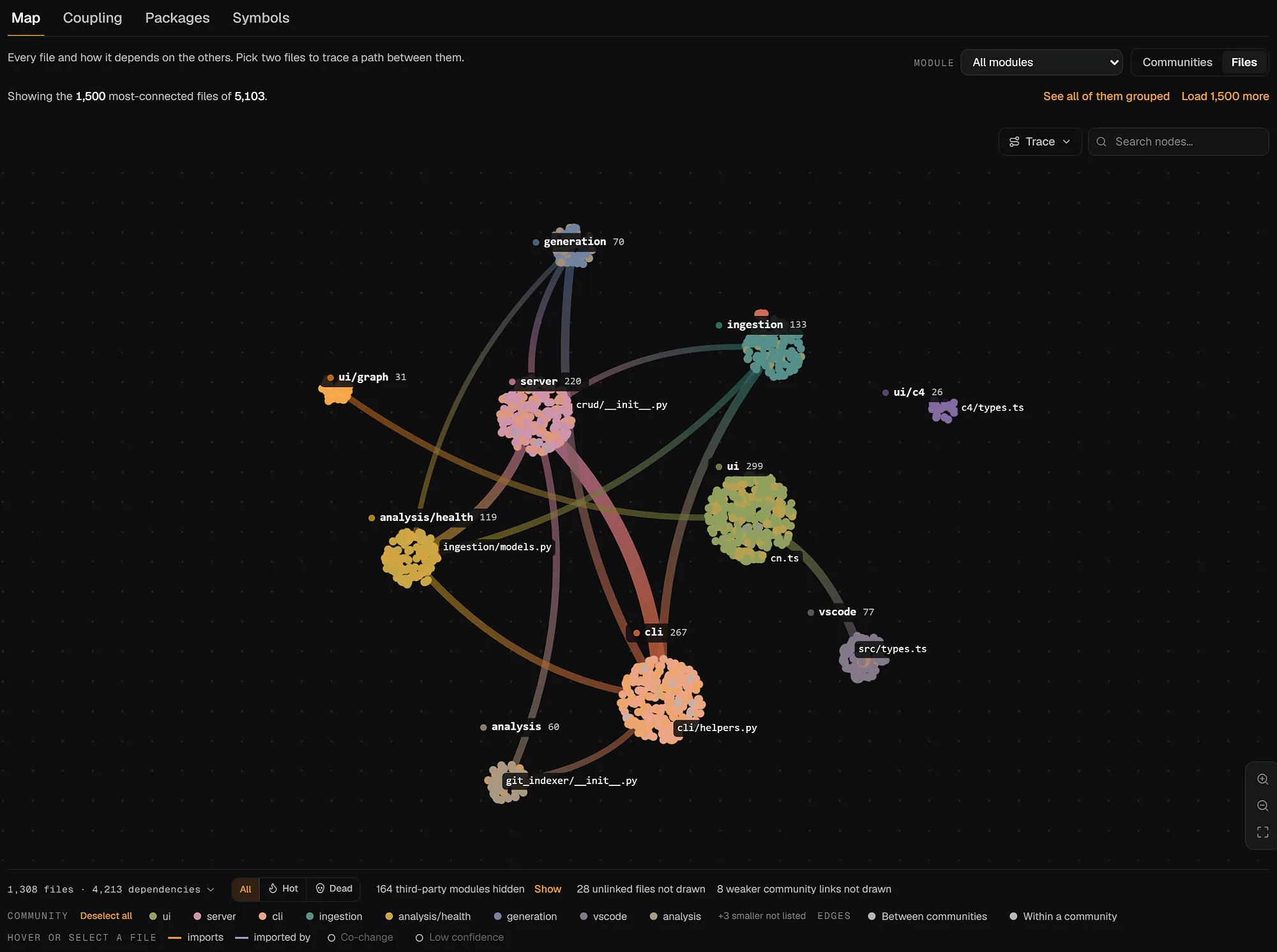
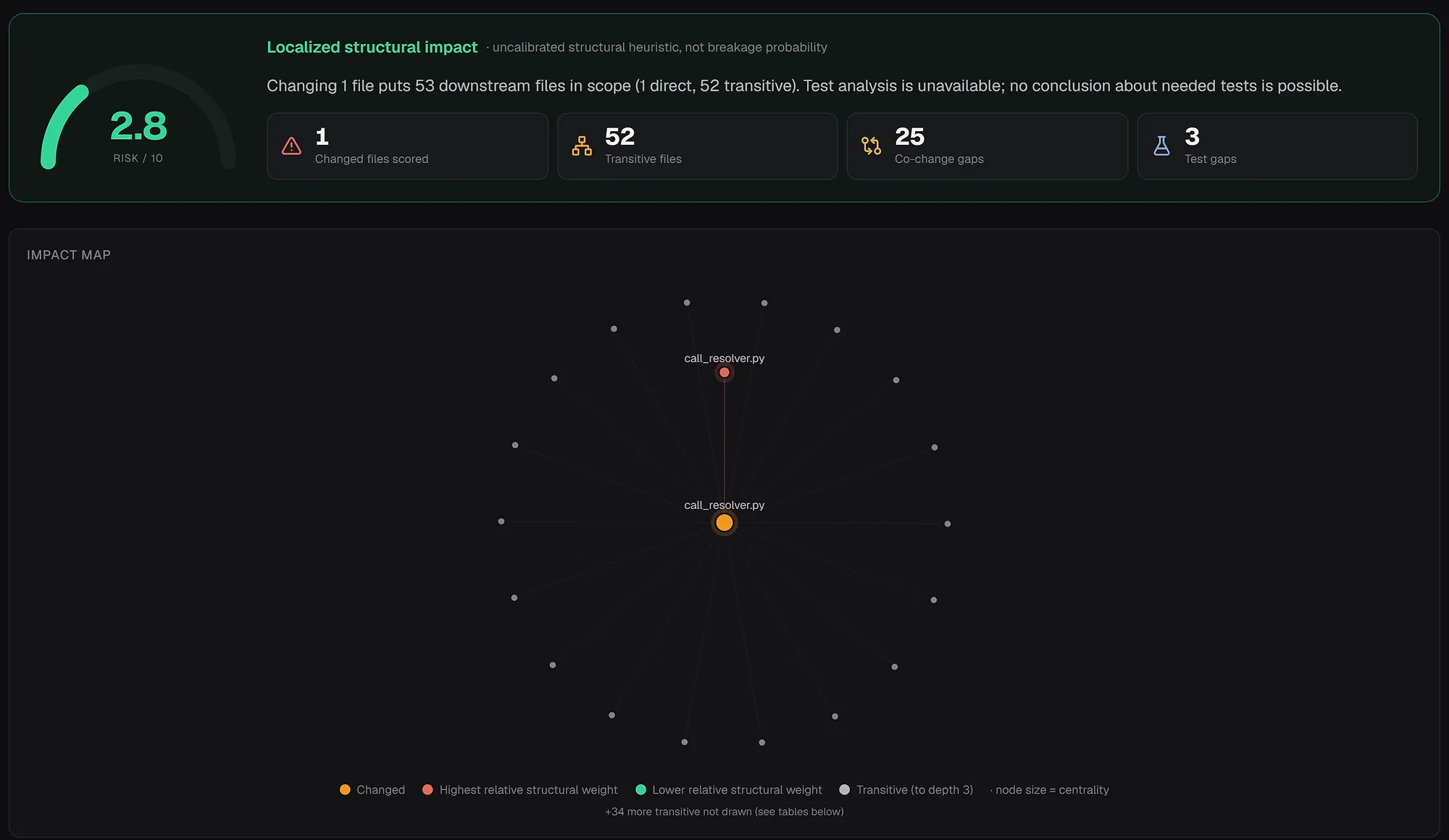
You can also inspect a real index in the browser: open the FastAPI architecture view or browse the live examples.
How to choose
Choose by the first problem you have, then add a second layer.
| Your situation | Start with |
|---|---|
| Builds and CI are slow; you want affected-only runs | Nx or Turborepo |
| You have one import loop to find in a JS or TS package | Madge |
| You want CI to fail when code crosses a boundary | dependency-cruiser |
| You want to delete what nothing reaches | Knip, or repowise for files and packages across languages |
| The repo mixes languages, or you need ownership and change impact | repowise |
| An AI agent needs structured repo context | repowise over MCP |
Scroll the table sideways to see every column.
A common stack: Nx or Turborepo runs the work, dependency-cruiser guards module boundaries in CI, and repowise shows where the risk and the refactor targets are. Asking one tool to do all three jobs blurs the graph. See the comparison pages for how repowise sits next to other code intelligence tools.
Finding circular dependencies
A cycle usually means a shared module became a dumping ground, a package boundary is wrong, or two modules own the same concept. The workflow that works across tools:
- Run the package graph first to rule out a cycle between packages.
- Run a file-level check (
madge --circularor a dependency-cruiser rule) on the suspect package. - Take the smallest loop and ask who owns those files and whether they are hotspots.
- Break the cycle at the lowest-risk edge.
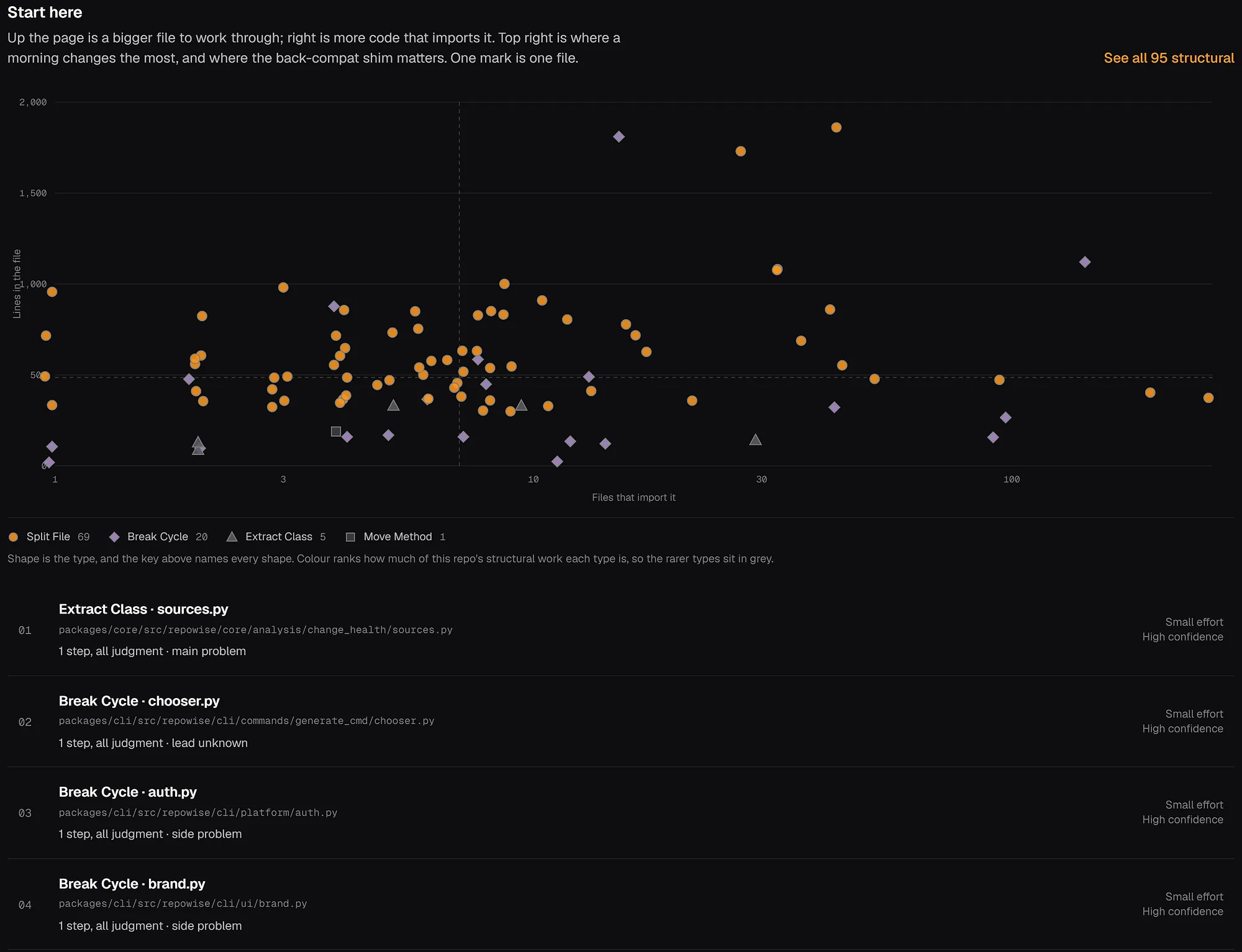
The last two steps are where repowise helps: its refactoring view ranks Break Cycle plans from the same graph, so you start with the edge that is cheapest to invert.
FAQ
- What is the best dependency graph tool for monorepos?
- It depends on the layer. Nx or Turborepo for a package graph that drives builds, Madge or dependency-cruiser for JavaScript and TypeScript import cycles and rules, and repowise for a file and symbol graph with history and change impact across many languages.
- What is the best tool to visualize a monorepo dependency graph?
- For the package level,
npx nx graphopens an interactive project graph in the browser, andturbo run build --graphwrites Turborepo's task graph as SVG, HTML, Mermaid or DOT. For files inside a JavaScript or TypeScript package,npx madge --image graph.svg src/writes an image. For a map that spans languages and adds ownership and blast radius,repowise serveopens a community view of every file. - How do I find unused dependencies in a monorepo?
- Knip reads a JavaScript or TypeScript monorepo from its entry points and reports unused files, exports and dependencies per workspace. dependency-cruiser can flag orphaned modules and production code that imports dev dependencies. repowise reports workspace packages that nothing else in the repository imports, next to unreachable files and unused exports.
- How do I generate a dependency graph for a JavaScript project?
- With dependency-cruiser,
npx depcruise src --include-only "^src" --output-type dot | dot -T svg > graph.svgdraws the graph and the same config can enforce rules in CI. Our JavaScript and TypeScript dependency graph guide walks through it, and Madge, on a real project. - What is the difference between a package graph and a symbol graph?
- A package graph shows relationships between workspace packages and is used for build order, caching and release order. A symbol graph tracks files, classes, functions and methods, and is used for refactors, change impact and finding the file that closes a cycle.
- Which tool finds circular dependencies fastest?
- Madge is usually the fastest first pass:
npx madge --circular src/lists the loops. dependency-cruiser is the better choice when you want a cycle to fail the build, since it enforces rules in CI. - Does Nx or Turborepo find circular dependencies?
- Nx can enforce project boundaries with tags, which prevents many cycles. Turborepo's graph exists to run tasks, and cycle detection is not its focus. For file-level cycles inside a package, add Madge or dependency-cruiser.
- Do these tools work outside JavaScript?
- Madge, dependency-cruiser, Knip and Turborepo target JavaScript and TypeScript. Nx extends further through plugins for Gradle, Maven, .NET and Go. repowise parses 28 languages to a full AST, so a repository that mixes languages gets one graph.
- Why does MCP matter for a dependency graph?
- MCP is an open standard for connecting AI applications to tools and data (modelcontextprotocol.io). A graph exposed over it lets an agent ask for callers, impact and the path between two files instead of guessing from raw file text.
- Can I run repowise on a private monorepo?
- Yes. The open source CLI (AGPL-3.0) runs locally with
pip install repowise && repowise init, so the graph is built on your machine with no model calls. Private repositories on the hosted product are part of Pro.