Repowise for Claude Code
See what Claude reads and changes, while it works.
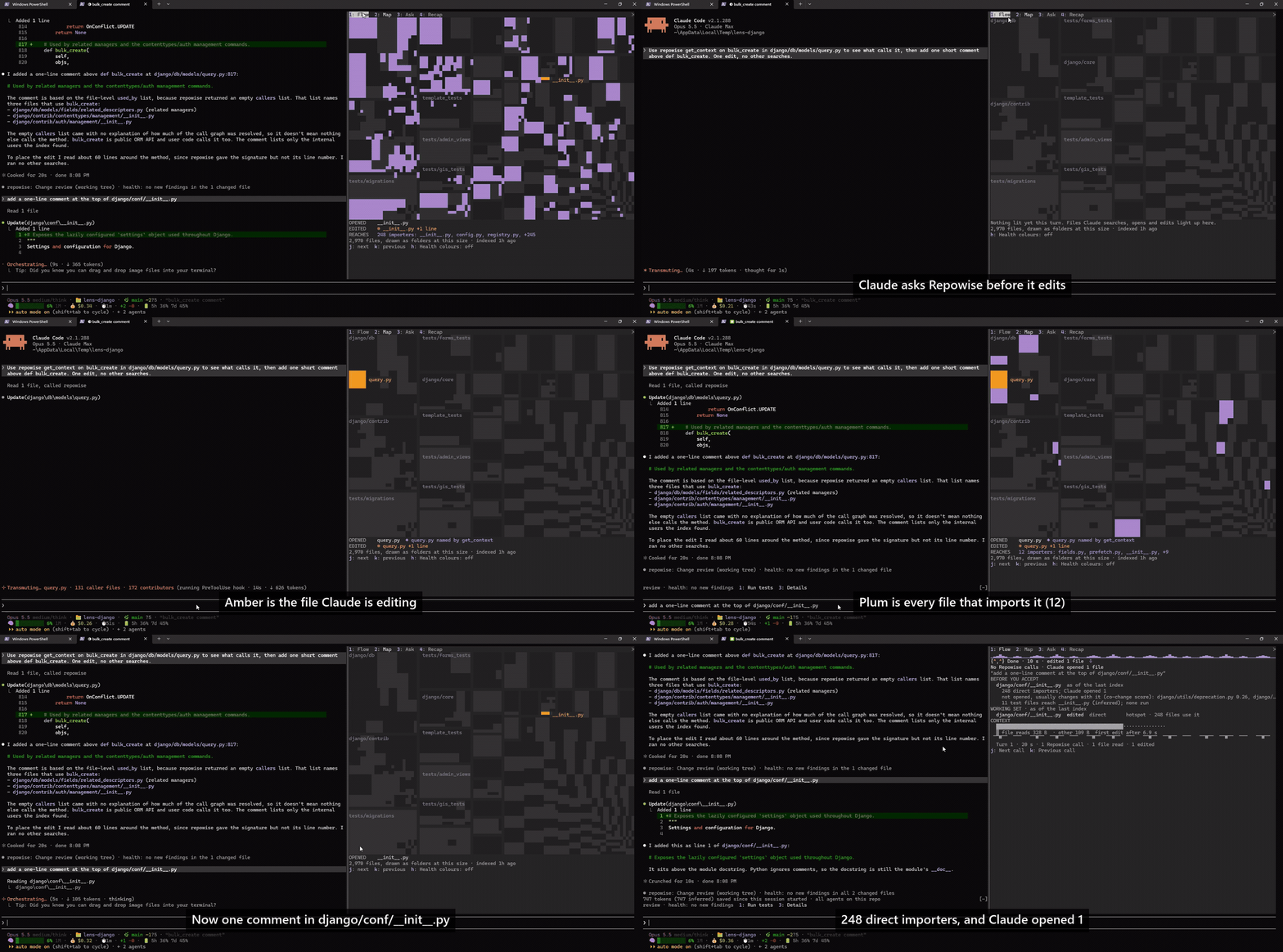
Lens shows what Claude opened, what it edited and what that reaches, as a map and a per-turn dashboard inside Claude Code.
It runs locally on your machine against a local index, and it makes no model calls of its own.
What you see
What Claude touched, and what that reaches.
A band above the prompt
It stays empty until there is something to say. When the index is behind your checkout, or something stops Lens from showing everything, it names the command to run. Lens shows the command and never runs it for you.
Lens map needs the local server: repowise serve --no-ui
Wording as Lens draws it; <N> is filled from your index.
A review after each turn that edits files
When Claude edits files, Lens reviews the working tree and puts one row under Claude's answer: what the change did to code health, the tests to run, and whether another branch edits the same files. It says whether the tests are measured or inferred from the dependency graph. A button can send Claude the tests to run, and nothing is sent unless you press it.
Change review (working tree, <N> changed files) · Health: no new findings in all <N> changed files · Tests to run: <N> tests, inferred from the dependency graph, not measured
Wording as Lens draws it; <N> is filled from your index.
The /lens pane and its Flow dashboard
Flow adds up each turn: what an edit reaches that Claude did not look at, where Claude's context came from, and what each Repowise call answered and how. The pane also has tabs for the map, for asking the index a question, and for a recap of the session.
BEFORE YOU ACCEPT · <N> direct importers; Claude opened <N>
Wording as Lens draws it; <N> is filled from your index.
A map of the repository lit by Claude's turn
Every file is a quiet tile. As Claude works, the files it searches, opens and edits light up, and the files that import an edit ripple out from it. A story strip under the map says in words what happened, so the map reads without colour.
SEARCHED · OPENED · EDITED · REACHES
Wording as Lens draws it; <N> is filled from your index.
Inspect and zoom from the keyboard
Step through the files the turn lit, zoom into the folder holding the selection, clear the selection and switch to health colours. The map needs the local server. Without it, the Map tab shows the setup hint.
j next · k previous · z zoom in · u up · x clear · h Health colours: off
Wording as Lens draws it; <N> is filled from your index.
Install
Install, index, then give Claude a task.
Install it from the Repowise marketplace inside Claude Code, as the plugin README describes.
Install the plugin
Run these in Claude Code. Lens ships inside the plugin, so there is nothing separate to install.
/plugin marketplace add repowise-dev/repowise /plugin install repowise@repowiseIndex the repository
In a terminal, in your repository. Install the CLI first if you do not have it. This builds the index without a model; see the docs for a model-written wiki.
pip install repowise repowise init --no-prose --yesStart the local server for the map
Optional. Without it, everything except the map and the savings row still works.
repowise serve --no-ui
Requirements
What it needs.
- Claude Code 2.1.287 or later. Older versions load the rest of the plugin and skip Lens.
- An indexed repository.
- Python 3.11 or later and git, for the repowise CLI.
- For the map, repowise serve --no-ui running on this machine for this repository.
What it never does
It watches. It does not steer.
- It makes no model calls of its own
- Lens makes no model calls of its own and reads the local index. The one case to know about is Ask: a question that does not start with "why" goes to get_answer, which may use the model your repository already configures. The Recap counts those replies.
- It never blocks Claude
- Lens never denies, holds, rewrites or approves Claude's tool calls. Every call and its result pass through unchanged.
- It sends Claude nothing unless you press a button
- Run tests and Brief Claude submit a prompt you can see in the transcript. Why only fills the Ask field. Your prompts and the compaction are left alone.
- It talks only to local servers
- Lens talks only to the plugin's own server and to the local Repowise server at a loopback address. It runs read-only git commands, writes no files in your repository and shows setup commands for you to run. The Repowise servers it talks to send anonymous usage telemetry unless you turn it off.
FREQUENTLY ASKED
Questions people ask first
Does Lens send my code anywhere?
Lens itself does not. It talks only to the plugin's MCP server and the local Repowise server on a loopback address, and it makes no model calls of its own. Two things in the rest of Repowise matter: an Ask question that does not start with "why" goes to get_answer, which may use the model your repository configures, and the Repowise servers send anonymous usage telemetry (tool name, status and coarse measures, never your questions, results or paths) unless you run repowise telemetry disable.
What do I need to run it?
Claude Code 2.1.287 or later and an indexed repository. The map and the savings row also need repowise serve --no-ui running on this machine.
Where does Lens show up?
In Claude Code's terminal interface and the desktop app. Nothing from Lens appears in the VS Code chat panel, in claude -p, in the Agent SDK, in cloud sessions or in desktop sessions running in WSL. In those places the rest of the plugin works as before.
Can I turn parts of it off?
Yes. The plugin has settings for margin notes, squeeze rows, the change review and the Flow tab, plus two that start off: opening the map pane on its own, and health colours on the map.
Watch Claude work on your own repository.
Install the plugin, index the repository and give Claude a task. Lens runs on your machine.