On this page
The best architecture documentation tools in 2026 split by who writes the architecture: Structurizr and IcePanel when an architect models it, Mermaid, PlantUML and Eraser when engineers sketch it in text, and repowise when you want it derived from the repository itself. Backstage TechDocs and Log4brains publish what the team writes (docs and ADRs) from markdown in git.
The short list, as of October 2026:
- repowise: architecture map, wiki and decision records generated from the code and git history, and served to coding agents over MCP.
- Structurizr: the reference "models as code" tool for the C4 model.
- IcePanel: collaborative visual C4 modelling for mixed technical audiences.
- Mermaid: diagrams inside markdown that GitHub and GitLab render natively.
- PlantUML: the long-running text-to-diagram tool for docs-as-code teams.
- Eraser: diagram-as-code with an infinite canvas and AI-drafted diagrams.
- Backstage TechDocs: markdown docs published inside Spotify's open source developer portal.
- Log4brains: architecture decision records in the repo, published as a static site.
We build repowise, so weigh our entry accordingly. The measurements we publish about it, with their methods, are on the benchmarks page.
What "architecture documentation" has to cover
A team needs three artifacts, and no single tool covers all three equally. Architecture docs fail when they try to be one document.
- A model or map: the C4 levels (system context, containers, components, code) or a dependency map. It answers "what is this and what talks to it".
- Decision records: ADRs capture why a choice was made, with context, the decision, its status and consequences. A diagram cannot say why.
- Currency: some way to know the first two still match the code. This is where most documentation quietly fails.
How we evaluated
We read each vendor's own documentation and pricing page on 12 October 2026 and compared on four things:
- Source of truth: a model file, a visual editor, markdown in git, or the repository itself.
- C4 and ADR support: native, partial or absent.
- Currency: does anything tell you when the docs no longer match the code?
- Cost and openness: license, free tier and list price.
We did not run a quality benchmark; these tools do different jobs, so the useful test is your own repository (see How to choose).
Comparison table
| Tool | Source of truth | C4 | ADRs | Detects drift from code | Price (October 2026) |
|---|---|---|---|---|---|
| repowise | The repository | Architecture map and system map generated from the graph | Mined from ADR files, comments, commits and PRs; staleness-checked | Yes, per decision and per page | Free for local use and public repos; private repos on Pro |
| Structurizr | A model file (DSL) | Native | Native (DSL section) | No | DSL and CLI free; server needs a license |
| IcePanel | A visual model | Native | Decision records on higher tiers | No | Free (up to 100 objects); Growth $40/editor/month annual |
| Mermaid | Markdown in the repo | Experimental C4 syntax | No | No | Free, open source |
| PlantUML | Text in the repo | Via add-on libraries | No | No | Free, open source |
| Eraser | Diagram-as-code plus canvas | Diagrams, not a C4 model | No | No | Free (3 files); Starter $15/member/month annual |
| Backstage TechDocs | Markdown in the repo | Whatever you write | Whatever you write | No | Free, open source; you run Backstage |
| Log4brains | ADR markdown in the repo | No | Native | No | Free, Apache 2.0 |
Scroll the table sideways to see every column.
Prices are list prices from each vendor's page on 12 October 2026. Confirm on the linked page before you buy. I build repowise; every other tool is described the way its own documentation describes it.
1. repowise
repowise builds architecture documentation from the repository instead of asking anyone to draw it. repowise init parses the code into a dependency graph, reads git history, and renders a wiki with a repository overview, a system map, a page per subsystem and a page per file, refreshed on each commit with repowise update. The full wiki needs no model key; a key adds prose to the subsystem and overview pages (wiki docs).
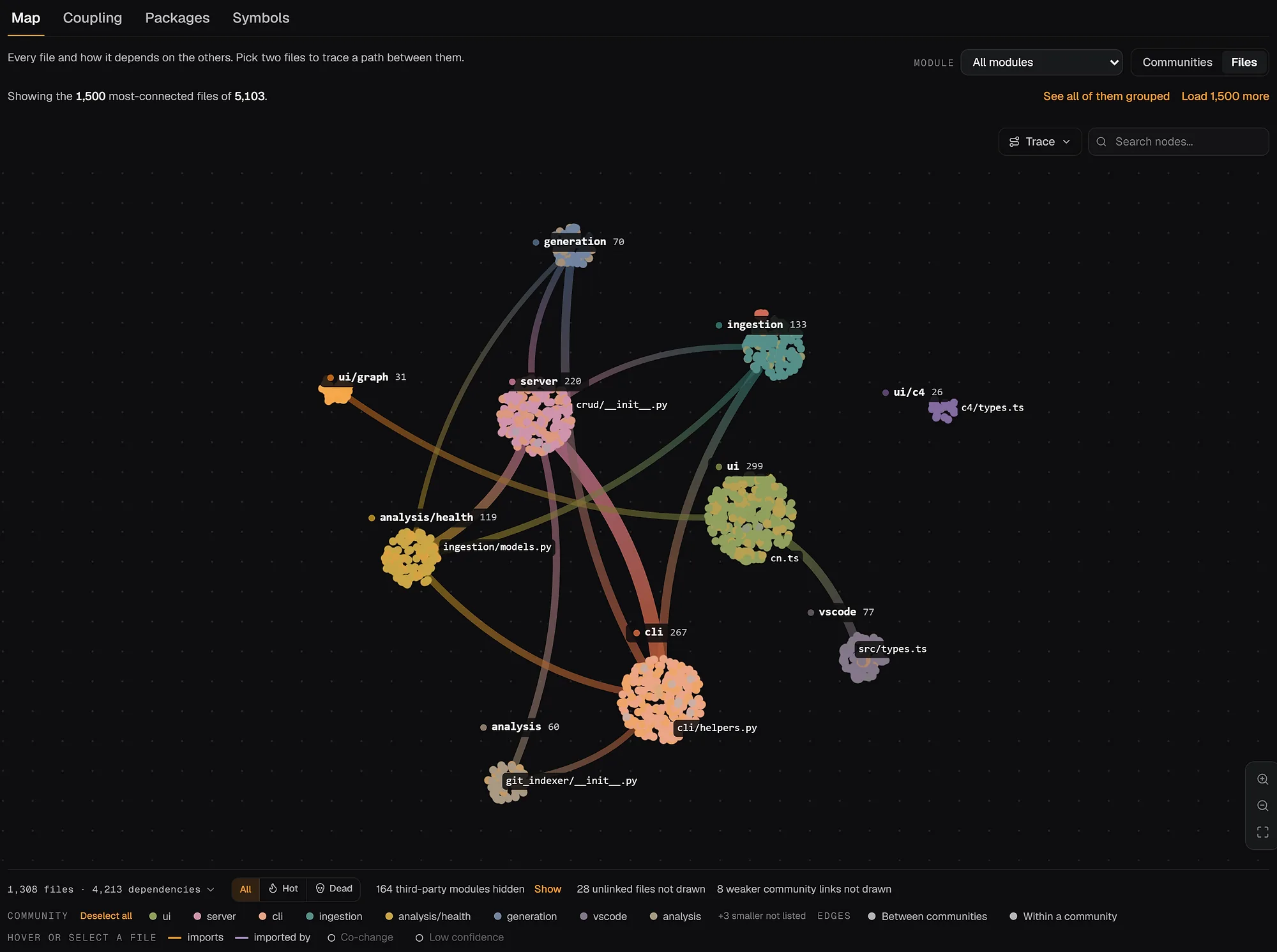
- Where it shines: currency. The map is recomputed from the code, so it cannot disagree with it, and the same index is what coding agents query through ten MCP tools. 27 languages are parsed to a full AST.
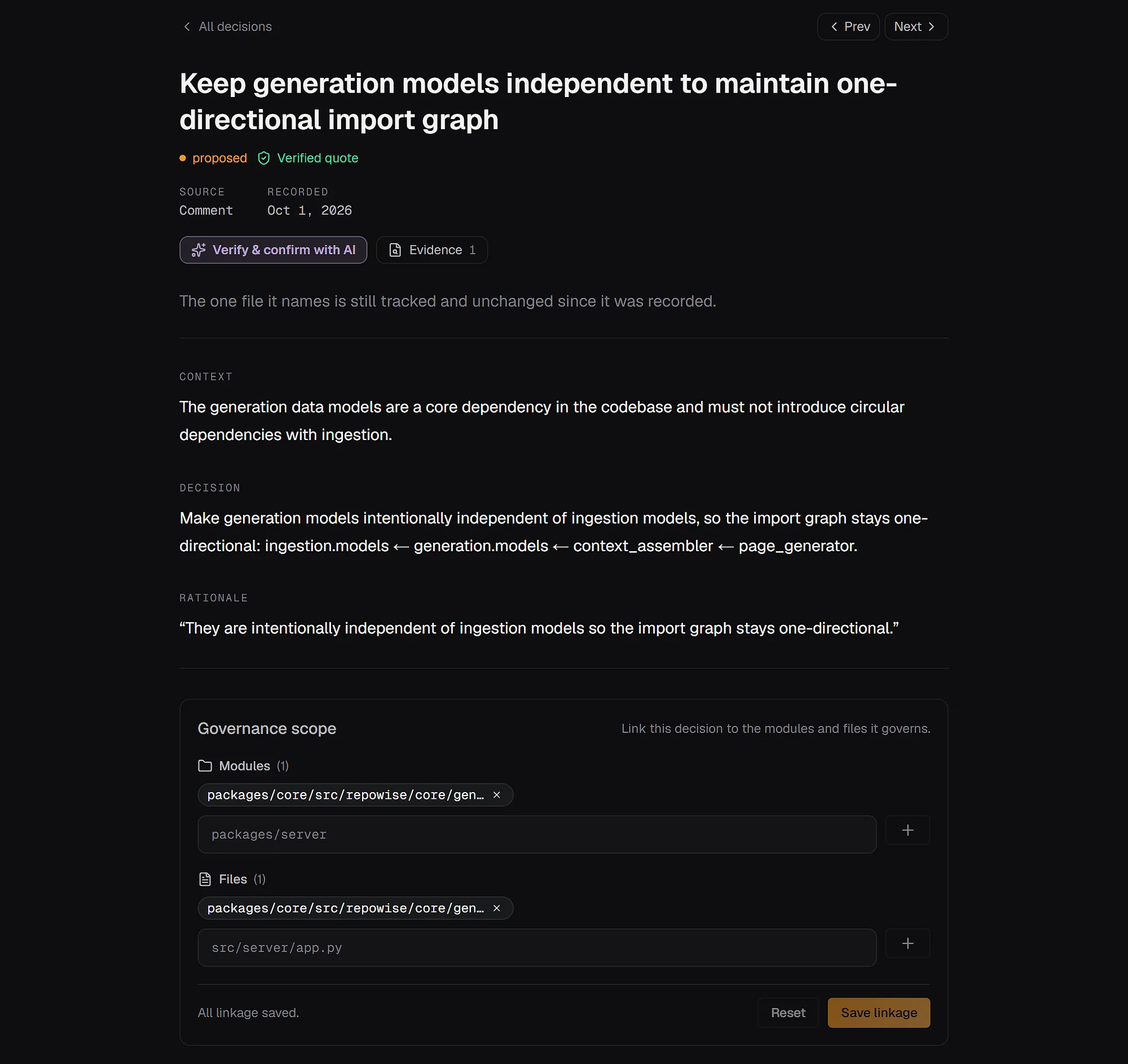
- Decisions: repowise finds the reasoning a team already wrote down (ADR files,
WHY:andDECISION:comments, commit messages, pull request bodies) and ties each record to the files it governs, with a verbatim quote that is checked against the source. A machine only proposes: a person (or a committed ADR marked accepted) makes it a decision that governs. Each decision then carries a currency (active,needs_review,stale), so you see which ADRs the code has outgrown (decisions docs).
pip install repowise
repowise init                       # graph, wiki and decision capture
repowise decision candidates        # proposed decisions awaiting review
repowise decision health            # stale, unscoped and ungoverned hotspots
repowise serve                      # browse the architecture map and wiki
- Pricing as of October 2026: the engine is open source under AGPL-3.0 and runs locally with no key. The hosted app is free for two public repositories and ten AI answers a month; private repositories are on Pro (pricing).
- Pick it if the code changes faster than anyone updates diagrams, you inherited a repository with no trustworthy docs, or you want the same architecture knowledge available to your coding agents. See it on a real codebase: the FastAPI architecture view and its generated docs.
2. Structurizr
Structurizr is a "models as code" tool for the C4 model: you describe the system once in a DSL and it renders multiple diagrams from that single model. Its docs include architecture decision records as a first-class part of the DSL (docs).
- Where it shines: discipline. One model, many views, version control friendly, and a clear split between model and rendering. It is the strongest fit for an architecture group that wants consistent C4 across many services.
- Pricing as of October 2026: per its docs, all Structurizr commands are free except the server, which needs a license when you use the prebuilt binaries. The DSL and CLI are free, and Structurizr Lite and on-premises are listed as end of life.
- Pick it if an architect or platform team will own the model and you need formal C4 views for review.
3. IcePanel
IcePanel is a visual, collaborative C4 modelling tool, built so people who do not want to learn a DSL can still maintain a shared architecture model. Its pricing page lists real-time collaboration, a technology icon library, an API, an MCP server and, on higher tiers, decision records and AI-generated descriptions (pricing).
- Where it shines: workshops and review sessions where product, engineering and ops all look at the same model.
- Pricing as of October 2026: Free for up to five editors and 100 model objects. Growth is $40 per editor per month billed annually; Scale is $80 per editor and starts at 20 editors; Enterprise is custom.
- Pick it if a mixed audience needs one visual model and you are happy to maintain it by hand.
4. Mermaid
Mermaid renders diagrams from text inside markdown, so a diagram lives in the same pull request as the code it describes. It has a C4 syntax for context, container, component, dynamic and deployment diagrams, which its docs label experimental: the syntax and properties can change (docs).
- Where it shines: the lowest friction on this list. READMEs, runbooks and service docs on GitHub or GitLab get diagrams with no extra tooling, and the source diffs cleanly.
- Pricing: free and open source.
- Pick it if the diagram is small, the audience is engineers and you want it reviewed like code.
5. PlantUML
PlantUML turns plain-text descriptions into UML and a long list of non-UML diagrams, and it is the dependable choice for docs-as-code teams. It supports sequence, class, component and deployment diagrams, several layout engines, and export to PNG, SVG and more (plantuml.com).
- Where it shines: breadth and maturity. RFCs, API design docs and sequence diagrams are its home ground. C4 is available through add-on libraries rather than built in.
- Pricing: free and open source, supported by sponsorship.
- Pick it if your team already keeps diagrams as source files and needs more diagram types than Mermaid offers.
6. Eraser
Eraser is a diagramming workspace with diagram-as-code, an infinite canvas and AI-drafted diagrams. Every plan includes diagram-as-code, markdown notes, more than 3,000 tech icons and integrations with GitHub, Notion, Confluence and VS Code (pricing).
- Where it shines: fast, good-looking system diagrams and design docs, with guests free on every plan.
- Pricing as of October 2026: Free (3 files, 3 AI diagrams). Starter $15 per member per month billed annually, Business $45, Enterprise custom.
- Pick it if you want polished design-doc diagrams quickly and a hosted editor suits you.
7. Backstage TechDocs
Backstage TechDocs is the docs-as-code layer of Spotify's open source developer portal: engineers write markdown next to their code and TechDocs publishes it as a site inside Backstage. It builds on MkDocs and links each site to the Backstage Software Catalog (docs).
- Where it shines: one place for every service's docs and owners, across GitHub, GitLab, Bitbucket and Azure DevOps. Spotify reports it hosts over 5,000 documentation sites.
- Pricing: free and open source; the cost is running Backstage.
- Pick it if you already run or plan a Backstage portal and want architecture docs published beside each service's catalog entry.
8. Log4brains
Log4brains logs architecture decision records as markdown from your IDE and publishes them as a static site with search and a timeline. It is Apache 2.0 licensed and deploys to GitHub or GitLab Pages or S3 (GitHub).
- Where it shines: it does one job, ADRs, with almost no overhead, and supports mono and multi-package repositories.
- Pricing: free and open source.
- Pick it if your first goal is a habit of writing ADRs in the repo and a readable site for them.
Hand-authored vs derived from the repo
Hand-authored tools are best when you are shaping a system or need a workshop artifact; derived tools are best when the code moves faster than people can redraw it. Every tool above except repowise renders what a person wrote, so its accuracy is the accuracy of the last person to update it.
Hand-authored fits when the system is small and stable, you are still designing, or you want full control over what a stakeholder sees. Derived fits when many services interact, ownership is split across teams, or the docs must stay current without reminders. They combine well: a derived map answers "what is true now", and a curated C4 view answers "what do we want the reader to understand".
For the wider picture of documentation that refreshes itself, see our guide to codebase documentation that stays current.
How to choose an architecture documentation tool
| If you are... | Start with |
|---|---|
| A small team, docs in GitHub | Mermaid for diagrams, Log4brains or plain ADR markdown |
| An architecture group standardizing C4 | Structurizr |
| Running workshops with non-engineers | IcePanel |
| Heavy on sequence and UML diagrams | PlantUML |
| Writing design docs with polished visuals | Eraser |
| Running a Backstage portal | TechDocs, plus an ADR folder per service |
| Inheriting a repo with no docs, or shipping fast with AI agents | repowise |
Scroll the table sideways to see every column.
A setup that covers all three artifacts: ADRs in the repo, Mermaid or PlantUML for small diagrams, Structurizr or IcePanel where formal C4 earns its cost, and repowise for the map, wiki and decision context generated from the code. If you already have docs debt, index the repository first and generate the missing baseline, then add hand-curated views only where they pay off.
FAQ
- What are the best architecture documentation tools for C4 diagrams?
- Structurizr and IcePanel are the dedicated C4 modelling tools. Structurizr is a models-as-code DSL that renders many views from one model; IcePanel is a visual editor built for collaboration. Mermaid also has C4 syntax, but its docs label it experimental. repowise generates an architecture map from the code rather than a hand-modelled C4 diagram.
- What are the best ADR tools?
- Log4brains is the focused option for writing ADRs in the repo and publishing them as a site. Structurizr supports ADRs inside its DSL, and IcePanel offers decision records on higher tiers. repowise reads existing ADR files and also mines decisions from comments, commits and pull requests, then flags the ones the code has outgrown.
- Is Mermaid good enough for architecture documentation?
- For small and medium systems, yes. Mermaid keeps diagrams in markdown and reviews them in pull requests. It is weaker for a large system that needs one shared model with many derived views, and its C4 syntax is still experimental as of October 2026.
- Should I use PlantUML or Mermaid?
- Use Mermaid when you want diagrams to render natively on GitHub or GitLab with no setup. Use PlantUML when you need more diagram types, more layout control or an established docs-as-code pipeline. Both fit a text-in, diagram-out workflow.
- How do I keep architecture documentation up to date?
- Make the source of truth the repository. Store ADRs next to the code, and use a tool that regenerates the map and wiki on every commit. repowise does this with
repowise update, and marks accepted decisionsneeds_revieworstalewhen most of the files they name have changed or disappeared. - What makes repowise different from diagramming tools?
- Diagramming tools render a model a person maintains. repowise builds its documentation from the code's dependency graph and git history, and exposes the same knowledge to coding agents through ten MCP tools. You can try it on a public repo by pasting its URL on the homepage, or locally with
pip install repowise && repowise init. - What should a team adopt first?
- Start with ADRs in the repo and one lightweight diagram format. Add a formal C4 tool if the organization needs a shared model. If docs already lag the code, add a repo-derived layer so the baseline is generated and refreshed from source; repowise for teams covers shared indexes and review.