On this page
- How we evaluated
- What counts as dead code
- Python: Vulture and deadcode
- JavaScript and TypeScript: Knip
- Go: deadcode and staticcheck
- Java and C#: IDE inspections and analyzers
- Rust: the compiler and cargo-machete
- Unused dependencies
- Mixed-language repos: repowise dead-code
- Side-by-side comparison
- How to choose
- FAQ
The best dead code detection tool depends on your language: Knip for JavaScript and TypeScript, Vulture for Python, the official deadcode command for Go, the compiler's own lint for Rust, PMD rules plus an IDE inspection for Java, and the SDK analyzers for C#. For a repository that mixes languages, repowise dead-code reads one dependency graph and reports unreachable files, unused exports and unused packages in a single pass. Whichever you run, treat the output as candidates and delete the strongest findings first.
| Language | Start with | Also worth knowing | Unused dependencies |
|---|---|---|---|
| Python | Vulture | deadcode (has --fix) | deptry |
| JavaScript / TypeScript | Knip | ts-prune (exports only) | Knip does it |
| Go | deadcode | staticcheck U1000 | go mod tidy |
| Java | IntelliJ "Unused declaration" | PMD Unused* rules | mvn dependency:analyze; Gradle Dependency Analysis Plugin |
| C# | Roslyn IDE0051 / IDE0052 | Rider and ReSharper inspections | None built in |
| Rust | the compiler's dead_code lint | cargo-machete, cargo-udeps | |
| Mixed-language repo | repowise dead-code | the per-language tools above | Unused packages in monorepos |
Scroll the table sideways to see every column.
Pricing: every tool in this post except repowise's hosted dashboard is free and open source. Facts below are from each project's own docs, read on 29 October 2026.
We build repowise, so weigh our entry accordingly. The measurements we publish about it, with their methods, are on the benchmarks page.
How we evaluated
We compared tools on four things a team feels in practice:
- What it finds. Unreachable files, unused exports and members, unused dependencies, or some mix.
- How it decides. Entry-point awareness, framework plugins, and whether it reports confidence.
- How it acts. CI fit, auto-fix, and how it handles known false positives.
- How far it reaches. One language or the whole repository.
What counts as dead code
Dead code is valid code that no entry point reaches. It comes in three kinds that need different checks, which is why one tool rarely covers all of them.
- Unreachable files: nothing imports the file and it is not an entry point. Only a project graph can show this; tools that read one file at a time cannot.
- Unused exports: functions, classes, types or constants that no other file imports. This is the easiest place to start.
- Zombie packages and dependencies: entries in
package.json,requirements.txtorCargo.tomlthat the code no longer uses. They cost build time, add security surface and make upgrades noisier.
Python: Vulture and deadcode
Vulture is the standard Python dead code finder. It walks the AST for unused classes, functions, methods, variables, imports, attributes and unreachable code. Version 2.16 shipped in March 2026 and needs Python 3.9 or newer (PyPI).
Every finding carries a confidence: 100% for unused arguments and unreachable code, 90% for imports, 60% for functions, classes, attributes and variables that dynamic code might reach. --min-confidence 80 hides the noisy tier, and --make-whitelist records today's false positives so the next run shows only new ones.
pip install vulture
vulture src/ --min-confidence 80
Pick Vulture if you want a lightweight Python check for CI with a built-in way to manage false positives. Decorators and framework magic (Django views, FastAPI routes, Celery tasks, pytest fixtures) are its usual false-positive sources, so whitelist them. Settings strings are another: running Vulture 2.16 on Scrapy, 56 of the 80 classes it flagged were middlewares and handlers that Scrapy's default settings load by dotted path.
deadcode (GitHub) is a newer option for whole-codebase checks that Ruff and flake8 do not do. It reports unused variables, functions, classes, imports, empty files and unreachable blocks under DCxxx codes, and deadcode . --fix removes them; --fix --dry shows the diff first. Use --dry every time, because auto-fix is only as good as its view of your entry points.
Add deptry for packages: it reports missing (DEP001), unused (DEP002) and misplaced dev (DEP004) dependencies and works with pip, Poetry, PDM, uv and PEP 621.
JavaScript and TypeScript: Knip
Knip is the strongest open source choice for JavaScript and TypeScript. It finds unused files, exports and dependencies in one pass, and its 200+ plugins teach it the entry points of Next.js, Vite, Vitest, Jest, ESLint, Nx, Storybook, GitHub Actions and more (knip.dev). It handles monorepos and workspaces, and it can auto-fix when you are ready (auto-fix).
npx knip                 # unused files, exports, dependencies
npx knip --production    # only code reachable from production entry points
The trade-off of any smart analyzer applies: configure entry files correctly. Miss one and Knip reports used code as unused; make entries too broad and you hide dead code (configuring project files).
Pick Knip if your project is JavaScript or TypeScript and you want files, exports and dependencies from one tool.
ts-prune prints unused exports from your tsconfig and nothing else. Its repository got a modernisation commit in September 2026 and a 0.11.0 tag, but npm still serves 0.10.3 from December 2021, which bundles TypeScript 4.5. unimported, the file-level counterpart, is archived and its README points to Knip. We ran all three on one monorepo in Knip vs ts-prune vs unimported. ts-prune still makes sense when you only want an export list; for a new setup Knip covers the same job and more.
Go: deadcode and staticcheck
The official deadcode command reports functions that no execution from main can reach. The Go team introduced it in December 2023; it uses Rapid Type Analysis over direct and interface calls (go.dev).
go install golang.org/x/tools/cmd/deadcode@latest
deadcode ./...
deadcode -test ./...    # count tests as entry points, for libraries
It needs a main entry point, so libraries run it with -test, and it cannot see functions reached only from assembly or go:linkname. staticcheck U1000 reports unused functions, types, fields and constants per package, treats exported names as used, and runs inside golangci-lint as the unused linter.
Pick both if you maintain Go services: U1000 in CI for the per-package view, deadcode occasionally for the whole-program view. go mod tidy handles unused modules.
Java and C#: IDE inspections and analyzers
Java has no single standard CLI for whole-program dead code, so teams combine an IDE inspection with CI rules.
- IntelliJ's "Unused declaration" inspection works best run project-wide and with your framework's entry-point annotations configured (Spring, JAX-RS, test frameworks) (JetBrains).
- PMD's
UnusedPrivateMethod,UnusedPrivateField,UnusedLocalVariable,UnusedFormalParameterandUnusedAssignmentrules run on every build. They cover private and local code only, which is why they are safe to enforce (PMD).
For dependencies, the Maven Dependency Plugin's mvn dependency:analyze reports "Unused declared dependencies" and "Used undeclared dependencies" from bytecode, and Gradle builds get the same report from the Dependency Analysis Gradle Plugin. Both can miss a library that is only loaded by reflection or at runtime, so read the list before you prune pom.xml.
Reflection, dependency injection and serialization are the usual false positives, so declare your annotations before trusting a list.
For C#, start with the analyzers in the SDK. IDE0051 flags unused private members and IDE0052 flags private members written but never read (Microsoft Learn). Set both to warning in .editorconfig. Unused public and internal code needs a solution-wide pass from Rider or ReSharper.
Rust: the compiler and cargo-machete
Rust reports unused private items at compile time. The dead_code lint is on by default. For dependencies, cargo-machete scans source for crates in Cargo.toml that nothing references, quickly but imprecisely by its own description. cargo-udeps gives the precise answer from compiler output and needs a nightly toolchain. A common setup is cargo-machete in CI and cargo-udeps now and then.
Unused dependencies
An unused dependency is dead code in your manifest. It still gets installed, scanned and upgraded.
| Ecosystem | Tool | What it reports |
|---|---|---|
| JS / TS | Knip | Unused and unlisted dependencies, plus files and exports |
| JS / TS | depcheck | Unused dependencies; its README says it is no longer maintained and points to Knip |
| Python | deptry | Missing, unused and misplaced dev dependencies |
| Rust | cargo-machete, cargo-udeps | Unused crates |
| Go | go mod tidy | Removes modules nothing imports |
| Java | mvn dependency:analyze, Dependency Analysis Gradle Plugin | Unused declared and used undeclared dependencies |
Scroll the table sideways to see every column.
If depcheck still runs in your CI, moving to Knip is a cheap win.
Mixed-language repos: repowise dead-code
repowise dead-code reports unreachable files, unused exports and unused packages across every language in the repository from one dependency graph. Every tool above stops at its language boundary, which is fine for a single-language repo and a gap in a TypeScript frontend, Python service and shared packages. repowise parses 28 languages into one graph, so a single report covers them all.
Each finding is scored from 0.0 to 1.0 and tiered high (0.7 and above), medium or low, with the evidence behind the score. Unreachable files are scored from git activity: a file untouched for a year starts at 1.00, one still being committed to starts at 0.40. A finding is marked deletion-ready only at 0.7 or higher and with no runtime-load risk on its path. The analysis is graph traversal plus git history: no LLM key and no network calls (dead code docs).
uv tool install repowise
repowise init
repowise dead-code --safe-only
 Kind              File / Symbol            Confidence  Ready?  Lines  Reason
 unused_export     formatLegacyDate               100%    ✓       14  Public symbol 'formatLegacyDate' has no importers
 unreachable_file  src/legacy/parser.ts           100%    ✗      212  File has no importers (in_degree=0)
The same findings reach coding agents through the get_dead_code tool, one of repowise's ten MCP tools, and appear in the dashboard's Dead code view with a triage status per finding. In a workspace, a finding is checked against cross-repo data, so a file another repository depends on is lowered in confidence. repowise is open source under AGPL-3.0 and self-hostable.
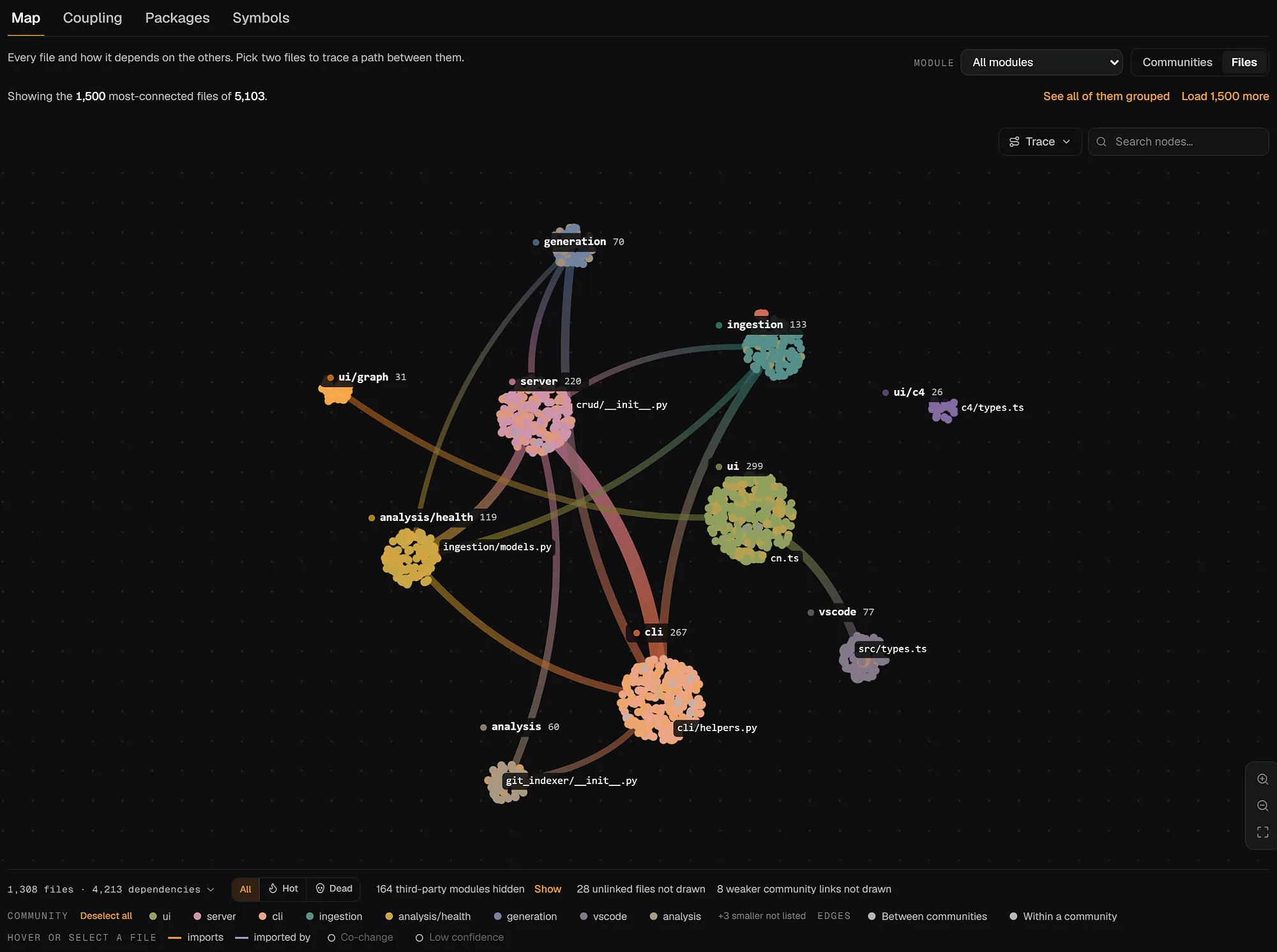
Pick repowise if your repository spans languages, you want git-aware confidence, or you want findings shared with agents and reviewers. Tiers and views are on the dead code feature page. Keep Knip or Vulture in CI for framework-specific depth. To see the output on a real codebase, open the FastAPI architecture map or browse live examples.
Side-by-side comparison
| Tool | Language | Unused exports / members | Unused files | Unused deps | Auto-fix |
|---|---|---|---|---|---|
| Vulture | Python | Yes, with confidence | No | No | No |
| deadcode | Python | Yes | Empty files | No | Yes (--fix) |
| deptry | Python | No | No | Yes | No |
| Knip | JS / TS | Yes | Yes | Yes | Yes |
| ts-prune | TS | Exports only | No | No | No |
deadcode | Go | Unreachable functions | No | No | No |
| staticcheck U1000 | Go | Yes | No | No | No |
| PMD Unused* rules | Java | Private and local only | No | No | No |
| IntelliJ inspection | Java, Kotlin | Yes | Partly | No | Quick-fix |
| Roslyn IDE0051/52 | C# | Private members | No | No | Code fix |
repowise dead-code | 28 languages | Yes, tiered | Yes | Unused packages | No |
Scroll the table sideways to see every column.
How to choose
- Single-language repo: run that language's tool in CI and add a whitelist or baseline for known exceptions.
- Polyglot repo or monorepo: run repowise for the cross-language view, and keep the per-language tools for their framework knowledge.
- Library you publish: exports have no importer inside the repo. Tag them (
@publicin Knip) and check dependents before deleting. - Cleanup sprint: start with one signal type, delete high-confidence leaf code first, and remove in small patches. The find dead code guide walks through it on a real repo.
FAQ
- What is dead code analysis?
- Dead code analysis finds code that can never run or is never used: unreachable functions, unused exports, files nothing imports and dependencies nothing references. Static tools build a graph from entry points; runtime tools such as production coverage find code that is reachable but never called.
- What is the best dead code detection tool for Python?
- Vulture is the standard starting point, with confidence values and a whitelist file for false positives. deadcode can also delete what it finds with
--fix, and deptry covers unused packages. - What is the best dead code detection tool for JavaScript and TypeScript?
- Knip. It finds unused files, exports and dependencies in one pass, supports monorepos and has plugins for most frameworks.
- What is the difference between dead code and unused code?
- Unused code is a declaration nothing references, such as an import, a variable or an export. Dead code also covers branches that can never run and whole files no entry point reaches.
- What tools detect unused dependencies and dead code in Java projects?
- PMD's Unused* rules and IntelliJ's "Unused declaration" inspection cover the code, and
mvn dependency:analyze(or the Dependency Analysis Gradle Plugin) covers dependencies.repowise dead-codeadds unreachable files and unused exports across Java, Kotlin and every other language in the same repository. - Is ts-prune deprecated?
- Not officially. The repository is not archived and was modernised in September 2026, but npm has had no release since 0.10.3 in December 2021. For new projects Knip covers files and dependencies as well as exports.
- How do I find unused dependencies?
- Use Knip for JavaScript and TypeScript, deptry for Python, cargo-machete or cargo-udeps for Rust,
go mod tidyfor Go andmvn dependency:analyzefor Maven projects. Avoid depcheck in new setups, since its maintainers say it is no longer maintained. - How do I find dead code across several languages?
- Run a graph-based tool that parses all of them.
repowise dead-codereports unreachable files, unused exports and unused packages from one dependency graph and tiers each finding by confidence. - Is it safe to delete what a dead code tool reports?
- Delete the highest-confidence findings after a full test run and review the rest. Static tools cannot see code loaded by string, reflection or an outside caller, so check files near dynamic loaders and exports of published libraries by hand. For deciding what to clean up first, see how to prioritize technical debt by impact per effort.