On this page
The best git analytics tools in 2026 are CodeScene and repowise for code-level questions (hotspots, ownership, bus factor), and Swarmia or LinearB for team-level delivery metrics. Code-level tools read commit history file by file. Team-level tools read pull requests and tickets. Pick the kind that matches the question you are asking, and add the other only when you have that question too.
The short list, as of October 2026:
- CodeScene: hotspots ranked by code health, knowledge maps and bus factor, from a mature commercial vendor.
- repowise: open-source hotspots, ownership, bus factor and co-change in one index with docs, a dependency graph and ten MCP tools.
- GitClear: durable change versus churn, and AI-written code attribution.
- LinearB: DORA metrics, PR cycle time and workflow automation for larger organizations.
- Swarmia: productivity metrics, working agreements and developer surveys, free for up to nine developers.
- Jellyfish: engineering investment reporting for leadership.
We build repowise, so weigh our entry accordingly. The measurements we publish about it, with their methods, are on the benchmarks page.
How we evaluated
We compared each tool on what a buyer decides on, using the vendor's own pricing page and documentation, fetched on 12 October 2026.
- Unit of analysis: files and modules, or teams and pull requests.
- Explainability: can the tool show why a file is a hotspot or why a person is listed as owner?
- Actionable bus factor: does it say what happens when someone leaves, beyond listing who touched a file?
- Fit: price model, self-hosting, and whether agents can query it.
Comparison table
| Tool | Level | Best at | Pricing (12 Oct 2026) | Open source |
|---|---|---|---|---|
| CodeScene | Code | Hotspots by code health, knowledge maps, bus factor | EUR 18 (Standard) or EUR 27 (Pro) per active author per month, yearly; free for open source | No |
| repowise | Code | Hotspots, ownership, bus factor and co-change next to docs, graph and MCP | Free for public repos; Pro and Teams for private repos | Yes (AGPL-3.0) |
| GitClear | Code | Durable change, AI-written code attribution | See gitclear.com | No |
| LinearB | Team | DORA metrics, PR cycle time, automation | $29 per contributor per month (yearly, 50 minimum); 45-day trial | No |
| Swarmia | Team | Productivity metrics, working agreements, surveys | Free up to 9 developers; Standard $45 per developer per month (yearly) | No |
| Jellyfish | Team | Investment and allocation reporting | Quote only | No |
Scroll the table sideways to see every column.
What is the difference between code-level and team-level git analytics?
Code-level git analytics treats the repository as the subject; team-level analytics treats the team as the subject. Both read the same git data and ask different questions of it.
| Code-level | Team-level | |
|---|---|---|
| Unit of analysis | File, module, function | Team, pull request, ticket |
| Typical question | "Which file should we fix first, and who knows it?" | "Why did cycle time go up this quarter?" |
| Main data | Commits, diffs, authorship, imports | PRs, reviews, deploys, Jira or Linear issues |
| Risk it catches | Knowledge silos, hidden coupling, decaying hotspots | Review bottlenecks, slow delivery, unplanned work |
| Typical buyer | Tech lead, staff engineer | Engineering manager, VP of engineering |
Scroll the table sideways to see every column.
The common mistake is buying one kind to answer the other kind's question. A DORA dashboard (DORA is the set of delivery metrics from Google's DevOps Research and Assessment program) cannot show that one person wrote most of the billing module, and a hotspot map cannot show that reviews wait two days because one team is overloaded. Many organizations run one of each.
What git history shows that the code does not
Git history records how often each file changes and who changes it, which a static scan of the code cannot see. A clean 2,000-line file is still a maintenance trap if it changes every week and only one person edits it. That is why hotspot analysis (ranking files by change frequency and difficulty) beats a plain complexity scan. The git hotspot guide covers the method.
History also exposes co-change: files that keep moving together even when the import graph looks tidy. The co-change detection guide shows how to find them, and the git intelligence guide defines hotspots, ownership and bus factor from scratch.
Code-level tools
CodeScene
CodeScene is the reference tool for prioritizing technical debt by combining change frequency with code health. It offers hotspot maps, code health scores, knowledge distribution, bus-factor analysis and refactoring targets, plus a CodeHealth MCP server and PR review. As of October 2026 pricing is per active author (anyone who committed in the last three months): EUR 18 per month on Standard and EUR 27 on Pro with yearly billing, with cloud and on-premises options. It is free for open-source projects. (codescene.com/pricing)
Pick it if you want a mature commercial product for code-health-driven refactoring and knowledge-loss reporting. See the CodeScene comparison, and our validation study that scores both tools on the same files.
repowise
repowise is the open-source option that puts git analytics in the same index as docs, the dependency graph and agent tools. One repowise init computes hotspots, ownership, bus factor and co-change pairs from git log and git blame, with no LLM key and no network calls for the ownership layer (ownership docs). We build repowise, so weigh this section accordingly.
Each file carries a primary owner, a recent owner, a contributor count and a bus factor (how many top authors cover 80% of commits). Three detectors turn that into findings: knowledge_loss (a changing file whose author has gone quiet), ownership_risk and developer_congestion. Agents read the same data:
repowise init
repowise context src/auth/session.py --include ownership
repowise risk --target src/auth/session.py
get_context(targets=["src/auth/session.py"], include=["ownership"])
get_risk(changed_files=["src/api/routes.ts", "src/middleware/cors.ts"])
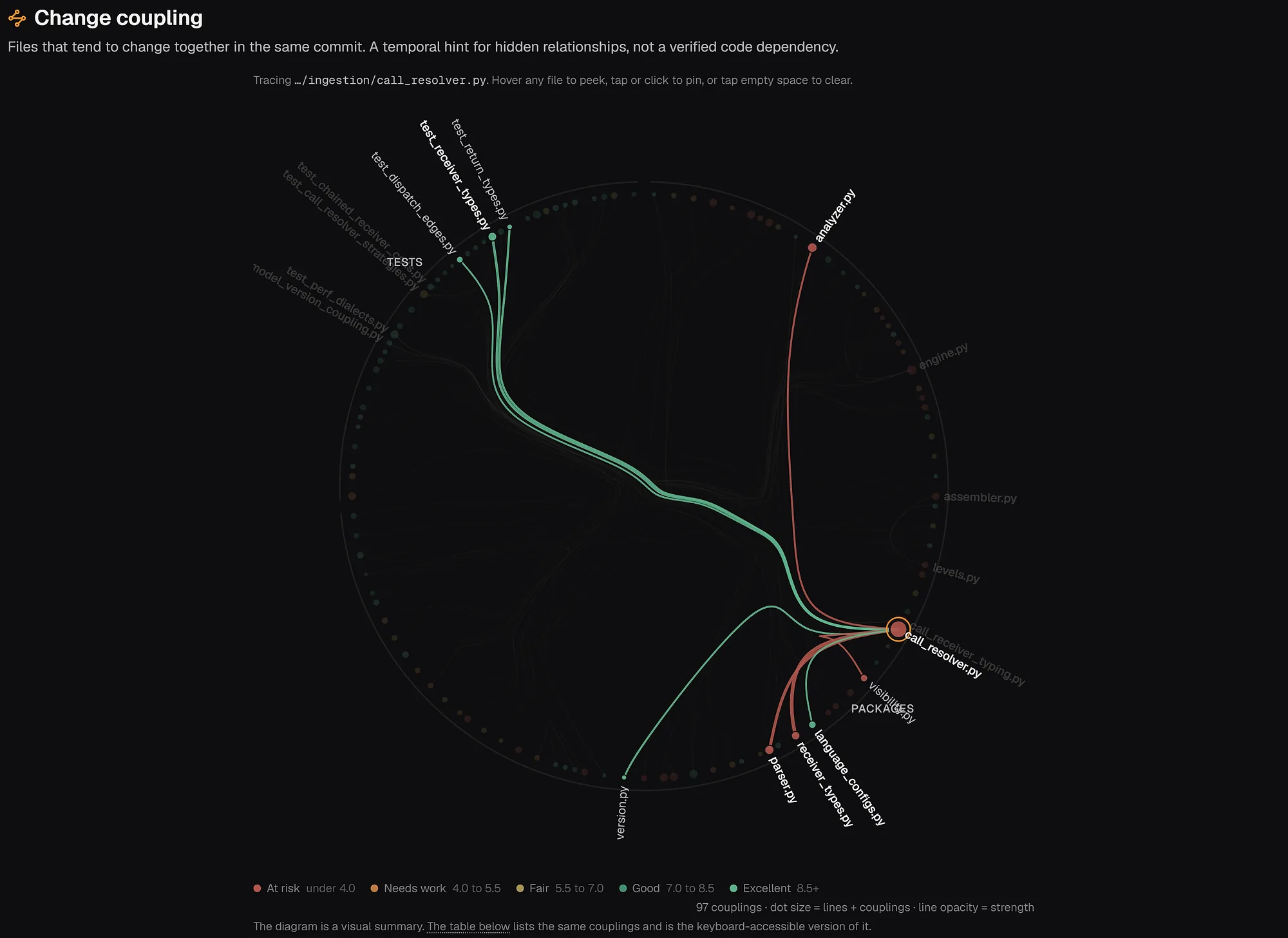
The capture shows the change-coupling view for call_resolver.py in the repowise repository: test files and sibling modules that move with it in the same commits. The code is AGPL-3.0 and self-hostable, and hosted repowise is free for public repos. Open the FastAPI ownership map or read about git intelligence to see it on real code.
Pick it if you want open source, file-level ownership tied to architecture and docs, and one index your coding agent can query.
GitClear
GitClear measures durable change rather than raw line counts. Its Diff Delta metric filters out duplicated fragments, rebases and other noise, and its product attributes lines to AI tools such as Copilot, Cursor and Claude Code. (gitclear.com)
It is a work-quality lens more than an ownership map. Pick it if you want to know whether AI-assisted output is durable. See the GitClear comparison.
Team-level tools
LinearB
LinearB is the choice when your organization runs on DORA metrics and wants to see where delivery slows down. It adds PR workflow automation, AI code review and an MCP server for asking about metrics. As of October 2026 Essentials is $29 per contributor per month billed yearly with a 50-user minimum, Enterprise is $59 with a 100-user minimum, AI features draw on monthly credits, and there is a 45-day trial. (linearb.io/pricing)
Pick it if you are a larger organization and the question is "where does our process slow down".
Swarmia
Swarmia pairs productivity metrics with developer experience. It connects GitHub or GitLab with Jira and Slack, tracks PR flow against working agreements the team sets, reports where engineering time goes, and runs developer surveys. It is free for companies with up to 9 developers; Standard is $45 per developer per month and Enterprise $55, billed yearly. (swarmia.com/pricing)
Pick it if you are a small or mid-size team that wants team-level metrics without a sales call.
Jellyfish
Jellyfish joins git and issue data to show where engineering effort goes, for leaders who report R&D investment to the business. Its packages (AI Impact, Developer Productivity, DevFinOps) are priced by seats and modules on request. (jellyfish.co/pricing)
Pick it if finance or executives consume the reports.
Capability matrix
| Tool | Hotspots | Ownership maps | Bus factor | Code health | DORA / cycle time | Dev surveys | MCP / agent access |
|---|---|---|---|---|---|---|---|
| CodeScene | Yes | Yes | Yes | Yes | Delivery insights (Pro) | No | CodeHealth MCP server |
| repowise | Yes | Yes | Yes | Yes | No | No | Yes |
| GitClear | Partial | Partial | Partial | Durable change | Some | No | Not a focus |
| LinearB | No | No | No | No | Yes | Some | Yes, for metrics |
| Swarmia | No | No | No | No | Yes | Yes | Not a focus |
| Jellyfish | No | No | No | No | Yes | Some | Not a focus |
Scroll the table sideways to see every column.
How to choose a git analytics tool
Start from the pain. If the pain is maintenance risk, start with a code-level tool. If it is process visibility, start with a team-level one.
- Small team, no budget: repowise on public repos, CodeScene free for open source, Swarmia free under 10 developers.
- Refactoring prioritization with commercial support: CodeScene.
- Coding agents in the loop: repowise, so agents read ownership and risk through MCP.
- DORA reporting at 50+ engineers: LinearB or Swarmia.
- Reporting to finance or the board: Jellyfish.
To pilot, run every code-level tool on one painful module over the same quarter of history, and check that each can explain its hotspots and owners. For team-level tools, pick one metric you already argue about, such as review wait time, and check it against what the team feels. You can also paste any public GitHub URL to see repowise on a repo you know.
FAQ
- What are git analytics tools?
- Git analytics tools read commit history, and often pull requests and tickets, to answer questions the code cannot: which files change most, who knows each part, how long reviews take and how fast the team ships. Some work at file level, others at team level.
- What is the best git analytics tool for hotspot analysis?
- CodeScene and repowise are the strongest fits. CodeScene centers on hotspots, code health and refactoring targets. repowise adds the same git signals to docs, a dependency graph and MCP access, and is open source.
- Is LinearB or Swarmia better?
- They overlap. As of October 2026, LinearB targets larger organizations (50-user minimum on Essentials) and leans on workflow automation and AI review. Swarmia is free under 10 developers and leans on working agreements and surveys, so small teams usually start there.
- Are there free git analytics tools?
- Yes. repowise is free on public repos, CodeScene is free for open source, and Swarmia is free for up to 9 developers. Open-source scripts such as gitstats and gitinspector cover basic commit statistics.
- What is the best code ownership analytics tool?
- For a commercial product built around knowledge loss, choose CodeScene. For open source with ownership tied to architecture and docs, choose repowise. LinearB and Swarmia do not produce file-level ownership maps.
- Do git analytics tools measure individual developer productivity?
- The good ones avoid it. Swarmia and LinearB report at team level by default, and code-level tools report on files. Ranking individuals by commits or lines changes behavior in ways nobody wants.