On this page
The best MCP servers for coding agents are repowise for questions about your own codebase, Context7 for current library docs, the GitHub MCP Server for pull requests and issues, and Playwright MCP for checking work in a browser. Add the Supabase MCP server or the reference Filesystem server only when your stack needs them. The Model Context Protocol is an open standard where servers expose tools, resources and prompts to a client such as Claude Code or Cursor (modelcontextprotocol.io), so a team can mix servers that each know one thing well.
The short list, as of October 2026:
- repowise: the codebase itself, from a precomputed graph, git history and decision index.
- Context7: current, version-specific documentation for libraries and frameworks.
- GitHub MCP Server: repositories, issues, pull requests and Actions on GitHub.
- Playwright MCP: browser automation through accessibility snapshots.
- Supabase MCP: database, edge functions and logs for Supabase projects.
- Filesystem (reference server): path-scoped reads and writes on local files.
We build repowise, so weigh our entry accordingly. The measurements we publish about it, with their methods, are on the benchmarks page.
How we evaluated
We compared each server on its own documentation, fetched on 12 October 2026, and on one question: does it hand the agent a small, precise answer, or a pile of text to sort through?
- What it answers: the kind of question the server is built for, and what it cannot know.
- Tool shape: narrow, named tools with bounded output, or one broad query.
- Scoping and safety: read-only modes, project or path scoping, and the documented risks.
- Cost and hosting: license, whether it runs locally or hosted, and what a team pays.
We did not benchmark these servers against each other. They answer different questions, so the useful comparison is fit, not a single score.
Comparison table
| Server | Answers | Runs | License | Scoping controls | Cost (October 2026) |
|---|---|---|---|---|---|
| repowise | Structure, history, ownership, risk, dead code, decisions of your repo | Local stdio, or HTTP | Open source | Per-tool allowlist, lean profile | Free locally; hosted Free is two public repositories |
| Context7 | Current docs for libraries | Hosted at mcp.context7.com | MIT (server source) | Query by library id | Free API key, higher limits with a key |
| GitHub MCP Server | Repos, issues, PRs, Actions | Hosted at api.githubcopilot.com/mcp/ or local | MIT | Toolsets, --read-only | Free server; GitHub account access applies |
| Playwright MCP | Live browser state | Local via npx | Apache 2.0 | Tool selection in client | Free |
| Supabase MCP | Database, functions, logs | Hosted or self-hosted | Official Supabase | project_ref, features, read-only | Free server; your project plan applies |
| Filesystem | Local files | Local stdio | Reference server | Allowed directories | Free |
Scroll the table sideways to see every column.
repowise: the codebase itself
repowise answers the questions an agent asks about your repository: where behavior lives, who owns it, what changes with it, and what breaks if it moves. It indexes the dependency graph across 28 languages parsed to a full AST, git history, generated docs, decision records, health and dead-code analysis, then serves them through ten MCP tools. None of the tools edits your code (MCP tools reference).
The ten default tools, by question:
| Question | Tool |
|---|---|
| How does X work, or where is it? | get_answer, search_codebase |
| What is this file, module or symbol? | get_context, get_symbol |
| What is the risk of editing this, or of this diff? | get_risk, get_change_risk |
| Why is the code shaped this way? | get_why |
| What does the codebase look like, and what is unhealthy or unused? | get_overview, get_health, get_dead_code |
Scroll the table sideways to see every column.
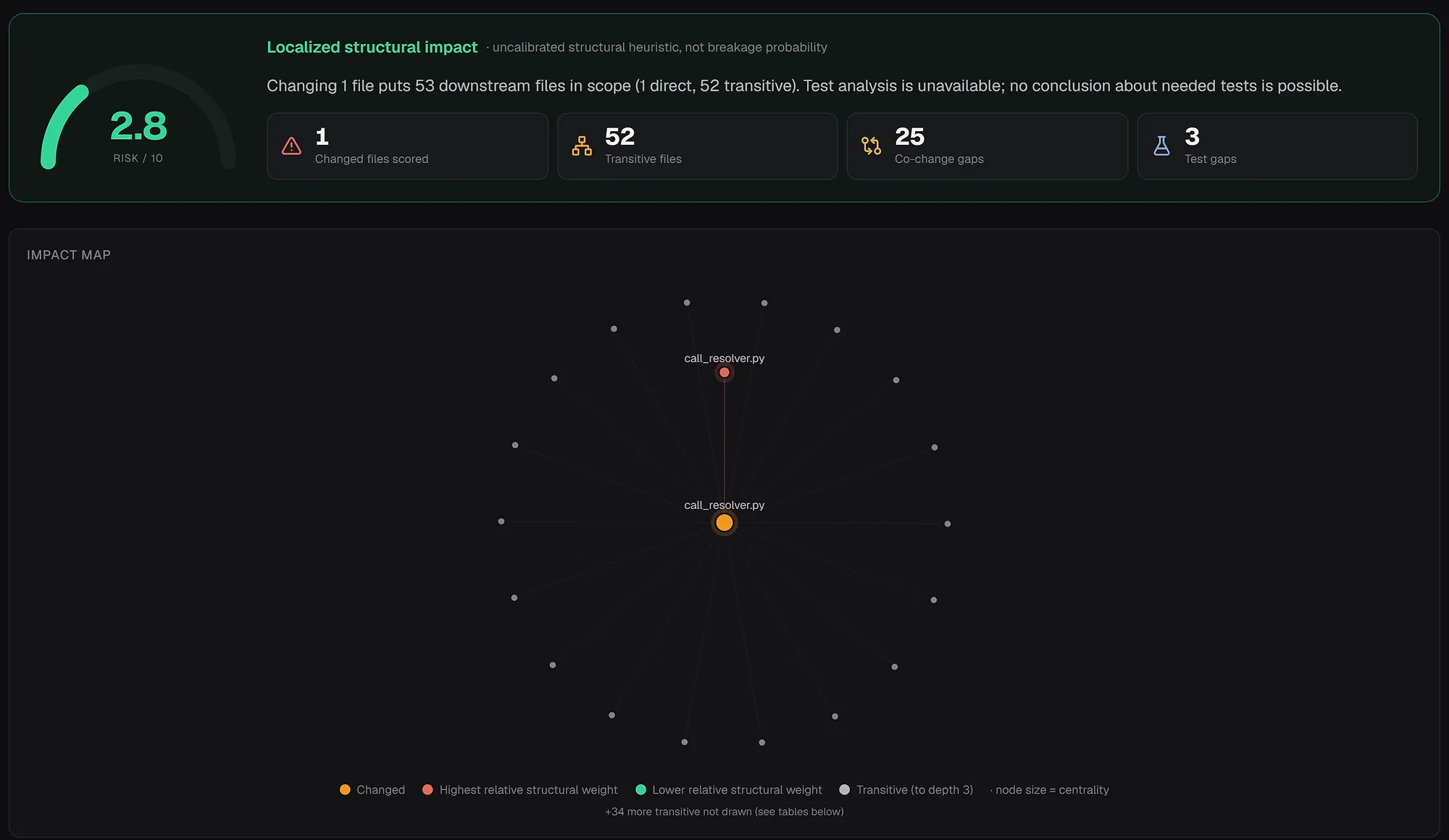
The precomputation is the point. A tool call returns a verified answer from the index instead of a directory listing the model must read, which is why agents spend fewer calls per task. Setup is one command: repowise init registers the server with Claude Code, and repowise mcp starts it on stdio for Codex, Cursor and other clients. The lean profile (repowise mcp --tools lean) keeps six tools loaded when you want the smallest schema footprint. See AI context and the MCP server and change risk.
Pick it if the repository is larger than one package, file names are not enough to find behavior, or you want a risk check before an edit lands.
Context7: current library documentation
Context7 puts up-to-date, version-specific documentation and code examples into the model's context, so an agent stops guessing at an API from training data (Context7 on GitHub). It exposes two MCP tools: resolve-library-id turns a library name into an id, and query-docs fetches documentation for a question. Setup is npx ctx7 setup, or point a client at https://mcp.context7.com/mcp. A free API key raises rate limits, and the server source is MIT licensed.
It knows libraries, not your code. Pair it with a codebase server so the agent has both the API a package expects and the local pattern your team uses.
Pick it if the agent writes against fast-moving frameworks or SDKs and keeps producing stale method names.
GitHub MCP Server: the platform layer
The GitHub MCP Server connects an agent to GitHub itself: repositories, issues, pull requests and workflow runs. GitHub maintains it under the MIT license, hosts a remote server at https://api.githubcopilot.com/mcp/ with OAuth, and also publishes a local build (github/github-mcp-server).
Tools are grouped into toolsets (repos, issues, pull requests, actions, code security and others), and the default set enables only context, repos, issues, pull requests and users. A --read-only flag skips write tools entirely, which suits an agent that should triage but never merge.
It reports what happened on the platform. It does not tell you which module is the structural hotspot, which is where a codebase server complements it.
Pick it if the agent triages issues, reviews pull requests or inspects CI runs, and your code lives on GitHub.
Playwright MCP: the browser
Playwright MCP lets an agent drive a real browser using accessibility snapshots rather than screenshots, so it needs no vision model and acts on structured page data (microsoft/playwright-mcp). It is Apache 2.0, runs locally with npx @playwright/mcp@latest, and exposes more than 50 tools for navigation, input, tabs, network mocking and storage.
It closes the loop on front-end work: the agent changes a component, loads the page and checks the result. With that many tools, trim the set in your client so the schemas do not crowd the context.
Pick it if the agent builds or debugs web UI and you want it to verify behavior in a browser.
Supabase MCP: backend platform context
The Supabase MCP server connects an agent to a Supabase project for database queries, migrations, edge functions, logs and security advisors (Supabase docs). It has the clearest scoping controls on this list: read-only mode runs queries as a read-only Postgres user, ?project_ref= limits access to one project, and ?features= enables only the tool groups you name.
Supabase documents prompt injection as the main risk, since text stored in your database can carry instructions, and recommends keeping manual approval on for interactive work.
Pick it if the application runs on Supabase and the agent needs to see schema, auth or logs.
Filesystem: path-scoped local access
The Filesystem server is a reference implementation for "secure file operations with configurable access controls" (modelcontextprotocol/servers). Most coding agents already read and write files natively, so this server earns its place mainly in clients and custom agents that lack that built in. Set the allowed directories to the one repository the agent should touch, never a home directory.
Pick it if your client has no native file access, or you want an explicit, auditable root for an agent.
How to choose
| Your situation | Start with |
|---|---|
| Large or long-lived repository, unfamiliar code, hidden coupling | repowise |
| Frameworks that change faster than model training | Context7 |
| Team on GitHub that wants issue and PR automation | GitHub MCP Server, read-only first |
| Web front end | Playwright MCP |
| App on Supabase | Supabase MCP, scoped to one project |
| Client without file tools | Filesystem, narrow root |
Scroll the table sideways to see every column.
A sensible default for a working team is repowise plus Context7 plus the platform server your code lives on. Add Playwright if the agent touches UI. Every extra server adds tool schemas to the context, so add one only when the agent keeps missing the same kind of answer.
Keep the surface small
- Prefer read-only modes and per-project scoping where the server offers them.
- Keep manual approval on for any server that can write.
- Trim tool lists in the client: repowise's
mcp.toolsconfig andleanprofile do this for the codebase server, and Claude Code documents tool search and output limits for large tool sets. - Never mix production credentials with broad scopes.
Try it
pip install repowise
cd your-repo
repowise init        # indexes the repo and registers the MCP server with Claude Code
repowise mcp         # stdio server for Codex, Cursor and other clients
Then ask your agent a question that normally takes several file reads, such as "what depends on the call resolver, and what changes with it?". You can browse indexed public repositories first in our live examples. For why the codebase layer matters, see giving AI coding agents real codebase context.
FAQ
- What are the best MCP servers for coding agents?
- Match the server to the question. repowise answers questions about your codebase, Context7 supplies current library docs, the GitHub MCP Server covers pull requests and issues, and Playwright MCP lets the agent check a browser. Add Supabase MCP or Filesystem only when your stack calls for them.
- Which MCP servers work best with Claude Code?
- Claude Code supports MCP servers and documents tool search and output limits for large tool sets. A common setup is repowise, Context7 and the GitHub MCP Server.
repowise initregisters its server with Claude Code automatically. - Which MCP servers work best with Cursor?
- The same mix works: repowise for the codebase, Context7 for docs, and the platform server for your backend. Cursor lists curated servers in its MCP documentation, and repowise runs over stdio for any client that supports it.
- How many MCP servers should an agent use?
- Two or three that match the stack. Each server adds tool definitions to the context window, so more servers cost tokens even when idle. Add another only when the agent repeatedly cannot answer one kind of question.
- Are MCP servers safe to give an agent?
- They are as safe as their scope. Use read-only modes, single-project scoping and narrow filesystem roots, and keep manual approval on for write tools. Treat any data an agent reads, such as database rows or issue text, as untrusted input that may contain instructions.
- Is the Model Context Protocol a standard?
- Yes. MCP is an open protocol with a public specification that uses JSON-RPC 2.0 for messages, and servers expose tools, resources and prompts (specification).