On this page
To self-host repowise, run repowise init --yes --no-prose on the machine that holds your repository, then start the Docker image with the repository's .repowise directory mounted at /data. The container serves the web dashboard on port 3000 and the API on port 7337, and the index never has to leave your network. This guide covers the build, the compose file, the access key, an air-gapped setup with Ollama, and how to keep the index fresh.
Part of the architecture overview.
What runs where
repowise has two halves: an indexer that reads your repository, and a server that serves what the indexer wrote. In the Docker setup the indexer runs on the host and the container is the server. Splitting them keeps the image small, keeps your git history out of the container, and lets the repository mount stay read-only.
| Piece | Where it runs | What it does |
|---|---|---|
repowise init / repowise update | Host (or CI) | Parses 28 languages to an AST, builds the dependency graph, reads git history, writes .repowise/ |
| API (FastAPI, port 7337) | Container | Serves the index over HTTP, behind REPOWISE_API_KEY |
| Web dashboard (Next.js, port 3000) | Container | Wiki, graph, health, dead code, ownership, decisions |
| MCP server | Host, or the separate repowise-mcp image | Gives agents the ten MCP tools over stdio |
Scroll the table sideways to see every column.
Everything is stored in .repowise/: a SQLite database (wiki.db) for pages, graph and git metadata, and an embedded LanceDB vector index for semantic search. There is no database or vector service to run. A PostgreSQL deployment with pgvector is available for multi-worker setups, as described in the architecture doc.
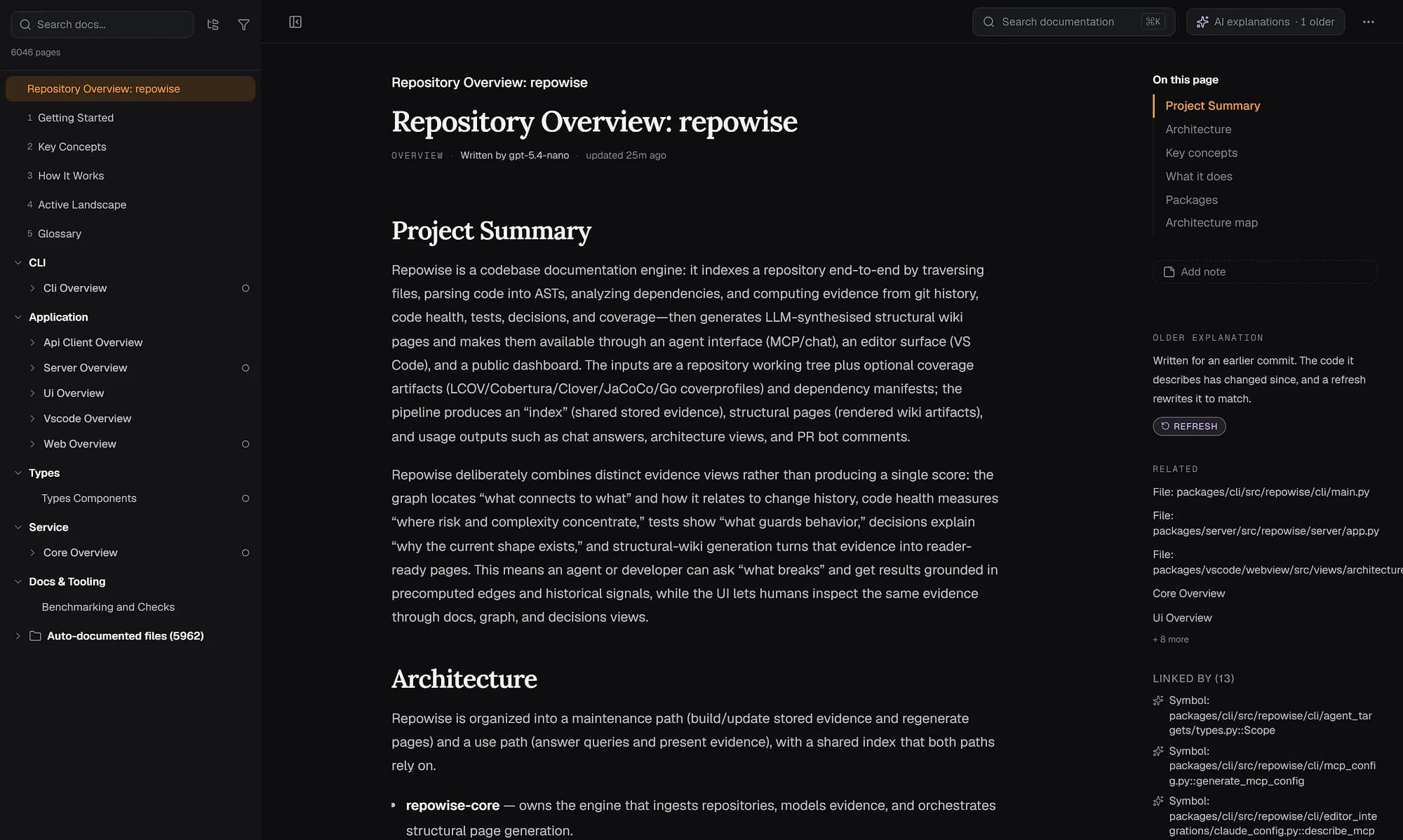
The dashboard the container serves: the wiki for the repowise repository, rendered from the index you mount.
Step 1: Index the repository on the host
The keyless index is the right first run: it needs no API key and makes no model call. It parses every file, builds the graph, mines git history, scores code health, finds dead code and renders a complete wiki from structure.
uv tool install repowise          # or: pipx install repowise
cd /path/to/your-repo
repowise init --yes --no-prose
--yes skips every prompt and --no-prose keeps the run keyless even if a provider key is set in your environment. Add --no-editor-setup when this is a scratch checkout and you only want .repowise/ written. A large repository takes a few minutes. See the quickstart for the interactive path.
Step 2: Build and run the image
The image is built from the repowise repository, and a single docker run serves your index. It is a multi-stage build: a Node stage compiles the dashboard, and a python:3.12-slim runtime installs repowise and runs as a non-root user.
git clone https://github.com/repowise-dev/repowise && cd repowise
docker build -t repowise -f docker/Dockerfile .

docker run -p 127.0.0.1:7337:7337 -p 127.0.0.1:3000:3000 \
  -v /path/to/your-repo/.repowise:/data \
  -e REPOWISE_API_KEY="$(openssl rand -hex 32)" \
  repowise
Open http://localhost:3000 for the dashboard and http://localhost:7337 for the API. The mount is the whole contract: /data holds wiki.db and the vector index, so losing that volume means re-running repowise init, not losing source code.
Step 3: Use Docker Compose for a team
The compose file in the repository adds safe defaults: loopback-only ports, a read-only repository mount and a required API key. It refuses to start if REPO_PATH or REPOWISE_API_KEY is unset.
export REPO_PATH=/path/to/your-repo
export REPOWISE_DATA=/path/to/your-repo/.repowise
export REPOWISE_API_KEY="$(openssl rand -hex 32)"

docker compose -f docker/docker-compose.yml up -d
The relevant parts of docker/docker-compose.yml:
services:
  repowise:
    ports:
      - "127.0.0.1:7337:7337"   # API, loopback only
      - "127.0.0.1:3000:3000"   # dashboard, loopback only
    volumes:
      - ${REPOWISE_DATA:-./data}:/data
      - type: bind
        source: ${REPO_PATH:?Set REPO_PATH}
        target: /repos
        read_only: true
    environment:
      - REPOWISE_API_KEY=${REPOWISE_API_KEY:?Set REPOWISE_API_KEY}
      - REPOWISE_EMBEDDER=${REPOWISE_EMBEDDER:-mock}
    restart: unless-stopped
To let teammates reach it, put the container behind your own reverse proxy and keep the ports on loopback, or change the published address deliberately. Clients send the key as a bearer token; the API reference lists the auth rules.
Access control: what the API key does
Without a REPOWISE_API_KEY, the server answers only callers on the same machine and returns 403 to any other host. The container binds 0.0.0.0 internally, so the key is the gate that matters once a port is reachable from the network.
| Setting | Caller | Result |
|---|---|---|
REPOWISE_API_KEY unset | loopback | allowed |
REPOWISE_API_KEY unset | another host | 403 |
REPOWISE_API_KEY set | no or wrong key | 401 |
REPOWISE_API_KEY set | correct bearer token | allowed |
Scroll the table sideways to see every column.
Two more habits keep a self-hosted instance tidy. Mount the repository read-only, as the compose file does. And treat /data like any other store of source-derived text: it contains file summaries and graph metadata, so give it the access controls you give the repository.
Step 4: Keep the index fresh
The index is only as current as the last repowise update. repowise init installs a post-commit hook that runs repowise update after every commit, which re-parses only what changed. On a shared server, run the same command from CI or a scheduled job against the checkout, then let the container read the refreshed .repowise.
repowise update      # incremental catch-up
repowise status      # what is indexed, and how far behind HEAD
The CI guide covers running the update on every push. When you upgrade repowise, rebuild the image from the matching tag so the dashboard and index versions agree.
Step 5: Add model-written docs, or stay air-gapped
Model prose is optional, and it can run on a model you host. A keyless index already renders subsystem pages from structure. repowise generate rewrites them as prose, reusing the index you have. Chat in the dashboard needs a provider.
| Setup | Provider | Embedder | Code leaves your network? |
|---|---|---|---|
| Keyless | none | mock | No |
| Hosted model | anthropic, openai, gemini and others | openai, gemini | Prompts go to that provider |
| Air-gapped | ollama | ollama | No |
Scroll the table sideways to see every column.
For the air-gapped row, install Ollama on a machine the container can reach and point repowise at it:
export OLLAMA_BASE_URL="http://host.docker.internal:11434"
export OLLAMA_EMBEDDING_MODEL="<your embedding model>"
repowise generate --provider ollama --model llama3.2 --dry-run   # cost estimate first
The same variables apply to the container: pass OLLAMA_BASE_URL and REPOWISE_EMBEDDER=ollama with -e. Provider and embedder options are in the configuration reference. repowise also sends anonymous usage telemetry containing no paths or source; DO_NOT_TRACK=1 or repowise telemetry disable turns it off, which locked-down environments usually want.
Connecting agents
Agents talk to repowise over MCP, and the MCP server runs next to the repository, not in the dashboard container. repowise init registers it for Claude Code and other hosts. The tool set is ten tools: get_answer, get_context, get_symbol, search_codebase, get_risk, get_change_risk, get_why, get_overview, get_health and get_dead_code.
For hosts that launch MCP servers as containers, the repository also ships a lean stdio image:
docker build -t repowise-mcp -f docker/Dockerfile.mcp .
docker run --rm -i -v /path/to/your-repo:/repo -w /repo repowise-mcp
It exposes no ports and serves the mounted repository's .repowise. Run it with -i and no -t, since it speaks JSON-RPC over stdin and stdout.
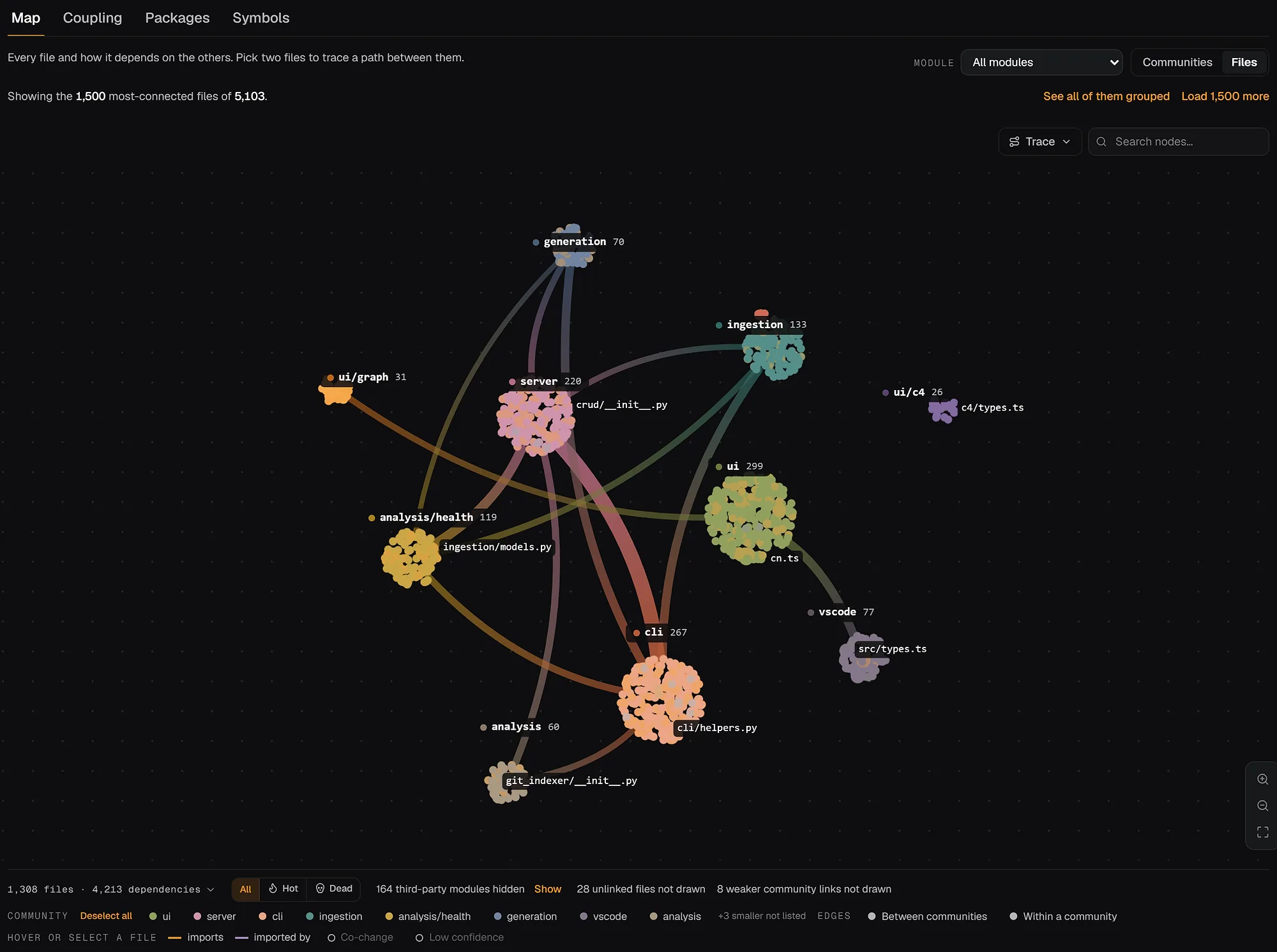
The architecture graph in the dashboard: files grouped into module communities, with the imports between them, shown for the repowise repository.
Pitfalls
- Empty dashboard. The mount must point at the
.repowisedirectory itself, not the repository root.wiki.dbshould sit directly under/data. - 403 from another machine.
REPOWISE_API_KEYis not set, or the request lacks the bearer header. - Dashboard loads but chat fails. Chat needs a provider key in the container environment. Everything else works from the parsed graph and git history alone.
- Stale answers. The container only reads the index. Run
repowise updatewhere the checkout lives. - Slow first index on a monorepo. Give the indexing host memory headroom, and use
--skip-testsor--skip-infrato narrow the scope.
FAQ
- Can I run repowise without an internet connection?
- Yes. The keyless index makes no model call, and an Ollama provider plus an Ollama embedder covers prose and chat. The dashboard bundle is built into the image, so the container needs no download at runtime.
- Do I need an LLM API key to self-host?
- No.
repowise init --yes --no-prosebuilds the graph, git analysis, code health, dead code and a full structural wiki with no key. A key adds model-written prose and dashboard chat. - Is there a prebuilt image on a registry?
- The documented path is to build from the repository with
docker build -t repowise -f docker/Dockerfile .. Building from a tag also guarantees the image matches the CLI version that wrote your index. - Where is my data stored?
- In the
.repowisedirectory you mount at/data:wiki.db(SQLite) and an embedded LanceDB vector index. Back it up by copying the directory, ideally while the container is stopped. - How is self-hosting different from the hosted dashboard?
- Self-hosting keeps the index on your network and costs nothing in licence fees under AGPL-3.0. The hosted version, free for two public repositories, adds managed indexing, the pull request bot and private repositories on Pro. See pricing.
- Which languages are supported?
- 28 languages are parsed to a full AST, and 15 are at the Full tier. Other file types are still tracked through git history. The matrix is in the language support doc.