On this page
- The quick answer by language
- What counts as dead code
- Step 1: Run your ecosystem's tool
- JavaScript and TypeScript: Knip
- Python: vulture
- Go: deadcode
- Rust: rustc and cargo-machete
- Step 2: Run one pass across every language
- Step 3: Read the confidence before you delete
- Step 4: Delete in small PRs
- Doing it at scale
- Pitfalls: why a finding can be wrong
- Which tool to use
- FAQ
To find dead code, run the standard tool for your language (npx knip for JavaScript and TypeScript, vulture src/ for Python, deadcode ./... for Go, cargo machete for Rust dependencies), or run repowise dead-code to get unreachable files, unused exports and unused packages across every language in one report. Every one of these starts from your entry points, follows the imports, and lists what the traversal never reaches. Treat the output as candidates: rank them by confidence and delete the strongest first.
Part of the code health guide.
The quick answer by language
Each ecosystem below has a tool its community already trusts. Commands are taken from each project's own documentation, as of October 2026.
| Ecosystem | Tool | Command | Finds |
|---|---|---|---|
| JavaScript / TypeScript | Knip | npx knip | Unused files, exports and dependencies |
| Python | vulture | vulture src/ --min-confidence 80 | Unused functions, classes, variables and imports |
| Go | deadcode | deadcode ./... | Functions no execution from main reaches |
| Rust (code) | rustc dead_code lint | cargo build | Unused private items |
| Rust (dependencies) | cargo-machete | cargo machete | Crates in Cargo.toml nothing uses |
| Any of 28 languages | repowise | repowise dead-code | Unreachable files, unused exports, unused packages |
Scroll the table sideways to see every column.
What counts as dead code
Dead code is valid code that no entry point reaches. It comes in three kinds, and each needs a different check, so a useful report keeps them apart.
| Kind | What it is | How it is found |
|---|---|---|
| Unreachable file | No file imports it, and it is not an entry point | Graph traversal from entry points |
| Unused export | A public symbol no import, call, inheritance or type reference reaches | Cross-reference each export against its importers |
| Unused dependency | A declared package or crate nothing imports | Compare the manifest against the imports |
Scroll the table sideways to see every column.
Branches that can never run (if (false), code after return) are a fourth kind. Compilers and linters already flag most of them. Grep is not a substitute for any of the three: it misses dynamic imports and re-exports through barrel files, and it counts a comment or a test name as proof that code is used.
Step 1: Run your ecosystem's tool
The fastest first pass is the single-language tool your ecosystem already uses. Each one prints findings with a location and, in vulture's case, a confidence.
JavaScript and TypeScript: Knip
Knip reports unused files, exports and dependencies and ships 190+ plugins (Next.js, Vite, Vitest, Jest, ESLint, Storybook and more) that teach it each framework's entry points. Its production mode ignores tests and config and checks only the code you ship.
npx knip                 # unused files, exports, dependencies
npx knip --production    # only code reachable from production entry points
The report is grouped by issue type (abbreviated):
Unused files (1)
src/legacy/parser.ts
Unused exports (1)
formatLegacyDate  function  src/utils/date.ts:14:17
ts-prune still works for unused exports only, and its README describes the project as resurrected after a long hiatus. For a new setup, Knip covers the same job and adds files and dependencies.
Python: vulture
vulture walks the AST and gives every finding a confidence: 100% for unused arguments and unreachable code, 90% for imports, 60% for functions, classes, attributes and variables that dynamic code might reach.
pip install vulture
vulture src/ --min-confidence 80
vulture src/ --make-whitelist > whitelist.py   # record known false positives
src/app/utils.py:3: unused import 'json' (90% confidence)
src/app/report.py:41: unreachable code after 'return' (100% confidence)
Settings can live under [tool.vulture] in pyproject.toml. Raising --min-confidence to 80 hides the 60% tier, which is where most dynamic-code false positives sit.
Go: deadcode
The official deadcode tool, introduced by Alan Donovan on the Go blog in December 2023, uses Rapid Type Analysis from main and package initializers, following both direct calls and interface method calls. When it reports a function, no execution of the program reaches it.
go install golang.org/x/tools/cmd/deadcode@latest
deadcode ./...
deadcode -test ./...                                   # count tests as entry points (for libraries)
deadcode -whylive=example.com/greet.hello ./...        # show the call path that keeps it live
greet.go:23: unreachable func: goodbye
greet.go:20: unreachable func: Goodbyer.Greet
Rust: rustc and cargo-machete
Rust covers private code at compile time. The dead_code lint is on by default, so cargo build already warns about unused private items. For dependencies, cargo-machete scans for crates in Cargo.toml that the code never references. It exits 1 when it finds any, which makes it a ready CI check. Crates used only by generated code go in [package.metadata.cargo-machete] ignored = [...].
Step 2: Run one pass across every language
repowise dead-code reports unreachable files, unused exports and unused packages for every language in the repository from one dependency graph. It is the tool for a polyglot repository, a monorepo with several package managers, or anyone who wants confidence that accounts for git history. The analysis is graph traversal plus git metadata: no LLM key, no network calls.
uv tool install repowise        # or pipx / pip install repowise
repowise init                     # parses the repo; findings are computed during indexing
repowise dead-code                # the report
repowise dead-code --safe-only    # deletion-ready findings only
 Kind              File / Symbol            Confidence  Ready?  Lines  Reason
 unused_export     formatLegacyDate               100%    ✓       14  Public symbol 'formatLegacyDate' has no importers
 unreachable_file  src/legacy/parser.ts           100%    ✗      212  File has no importers (in_degree=0)
 unreachable_file  config/feature_flags.py         40%    ✗       31  File has no importers (in_degree=0)

Cleanup-candidate lines: 14 (high 2, medium 1 confidence)
Each row names the kind (unreachable_file, unused_export, zombie_package), the file or symbol, its confidence, whether it is ready to delete, its line count and the reason. When the index is at HEAD, the command reads the findings stored at indexing time; otherwise it analyzes the working tree live and says so.
For scripts and review tools, ask for JSON:
repowise dead-code --kind unused_export --format json
[
  {
    "kind": "unused_export",
    "file_path": "src/utils/date.ts",
    "symbol_name": "formatLegacyDate",
    "confidence": 1.0,
    "reason": "Public symbol 'formatLegacyDate' has no importers",
    "safe_to_delete": true,
    "risk_factors": [],
    "lines": 14,
    "primary_owner": "Dana Reyes",
    "export_only": false
  }
]
Other flags: --min-confidence (default 0.4), --format md, --include-internals for unused private symbols, --no-include-zombie-packages, and --no-unreachable / --no-unused-exports to narrow the scope. repowise dead-code --help lists them all.
Step 3: Read the confidence before you delete
A flat list of "unused" items is not safe to act on; a score with its evidence is. repowise scores every finding from 0.0 to 1.0, starting from a base per kind and only ever lowering it:
- Unreachable files are scored from git activity. A file untouched for a year or more starts at
1.00, one still being committed to at0.40, and one under 30 days old at0.55, because new files are often unfinished. - Unused exports start at
1.00when the file has importers and none of them takes the symbol. Symbols marked deprecated start at0.30. - Zombie packages, top-level packages no other package imports, start at
0.50. - Caps pull a finding down to
0.40when a runtime loader sits in the same directory, the path looks like config or bootstrap code, the export's name is written elsewhere in the repository, or the name appears in a file that could not be indexed. Each cap adds a line of evidence saying why.
| Tier | Confidence | What to do |
|---|---|---|
| High | 0.7 and above | No references found. Delete after a test run. |
| Medium | 0.4 to 0.7 | Something indirect may reach it. Review first. |
| Low | Below 0.4 | Plausibly used at runtime. Hidden by default. |
Scroll the table sideways to see every column.
A finding is marked deletion-ready only when it scores 0.7 or higher and its path carries no runtime-load risk (config, environment, bootstrap, database, script or served-asset paths). Unreachable files are never marked ready, because build scripts and loaders read files by path. In practice, the safe-to-delete pile is unused exports with strong evidence.
Step 4: Delete in small PRs
Delete dead code in small, single-purpose PRs, strongest evidence first.
- Start with deletion-ready exports from the high tier.
- Group by module, so one reviewer who knows that area can check it for dynamic use.
- Run the full test suite. If the code was dead, nothing fails.
- Treat unreachable files as a review queue. Search build files, manifests and config for the path before removing one.
- Keep removals out of feature PRs, so a revert brings back one thing.
Doing it at scale
At scale, dead code detection has to run continuously, reach every language, and feed the people and agents doing the cleanup. repowise does that from the same graph on four surfaces.
On every update. Findings are recomputed by repowise init and repowise update, so the report is always as fresh as the index. In the dashboard, the Dead code view groups findings by tier, keeps a safe-to-delete pile and an owner leaderboard, and lets you mark each finding open, acknowledged, resolved or false_positive. A finding you resolve stays out of the open list on later updates.
From an AI agent. The get_dead_code tool, one of repowise's ten MCP tools, gives Claude Code, Cursor or any MCP client the same findings with confidence and evidence attached. Ask the agent to "remove the high-confidence unused exports in services/billing and open a PR", and it starts from:
get_dead_code(tier="high", safe_only=True)
The response also reports, per language, how much of the call graph was resolved, so the agent knows how far to trust a finding before it edits.
Across repositories. In a workspace, a file dead inside its own repository may be the surface another one depends on. get_dead_code checks each finding against cross-repo data: a file that changes together with files in another repository has its confidence halved and carries a cross_repo_note naming them, and an unused export in a package another repo depends on drops to 30% of its score.
In the editor. The VS Code extension lists the same findings in a tree beside the code.
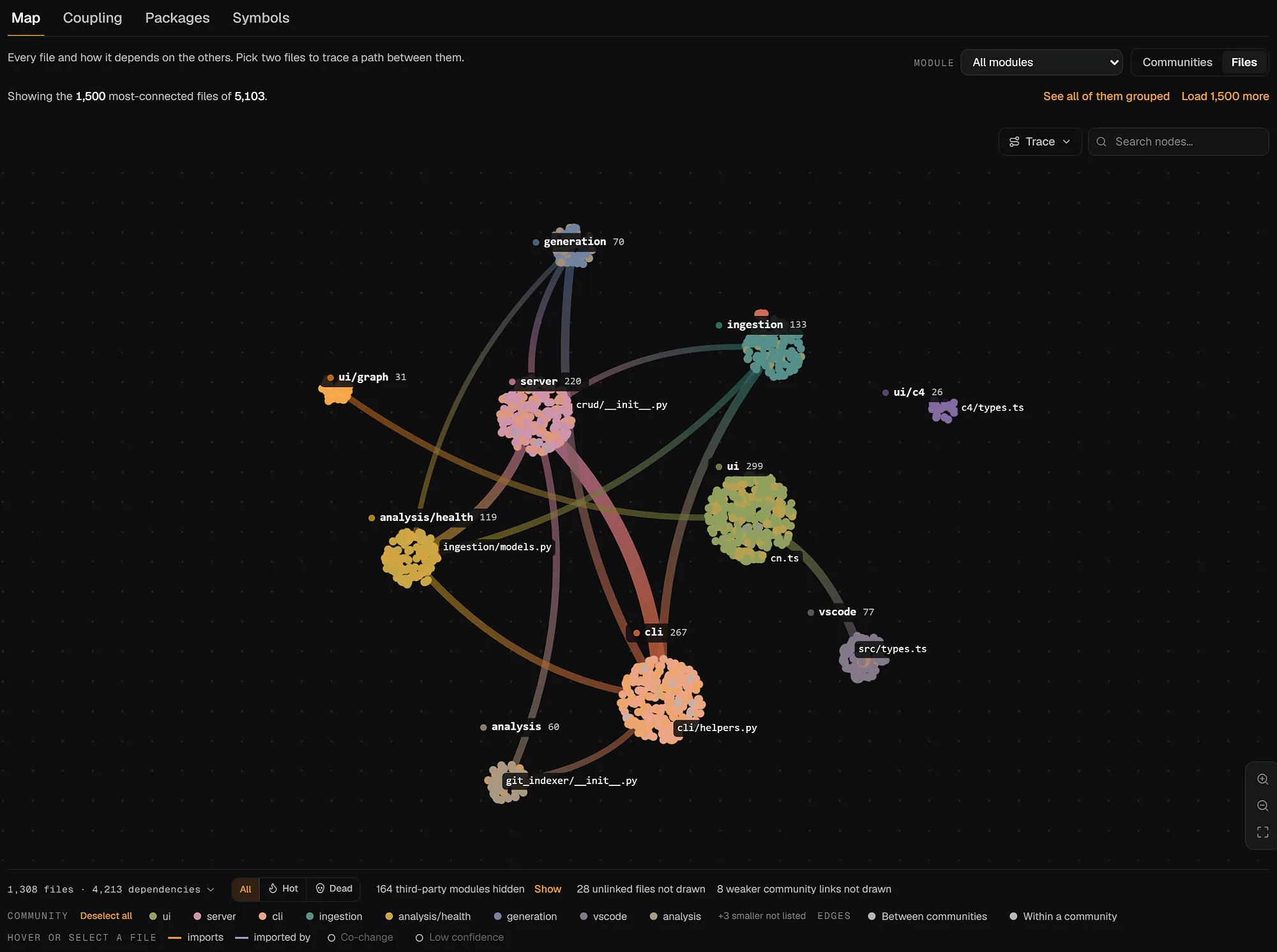
To see this on a real codebase before installing anything, open the FastAPI architecture map or browse the live example repositories.
Pitfalls: why a finding can be wrong
Every static dead code tool proves that nothing imports a symbol, never that nothing loads it. These are the cases where that gap shows, and how to recognise each one.
- Dynamic imports.
importlib.import_module(name),import(path),require.context()and Go'splugin.Open()load code by string. repowise recognises these loaders in Python, JavaScript, TypeScript, Java, Kotlin, Ruby, PHP, Go, Swift, Scala, Rust, C# and C/C++, and caps every file in the same directory at the review tier. With Knip, declare such files as entries; with vulture, add them to the whitelist. - Reflection and string dispatch.
Class.forName(),ServiceLoader.load(), Ruby'sconst_getand a handler looked up in a registry dict or a YAML file reach code no import names. A cluster of findings that all share a naming pattern (*Handler,*Plugin) usually means dispatch, not death. - Public APIs. A published library's exports have no importer inside the repository, because their callers live in other people's code. Before deleting an unused export from a package you publish, check its download stats or dependents. In Knip, tag such exports
@public; repowise's workspace pass lowers exports another repository depends on, and packaged .NET projects are held at0.30automatically. - Framework entry points. Routes, CLI commands, serverless handlers, Celery tasks and pytest fixtures are called by the framework, not by your code. Knip's plugins and repowise's exemptions cover the common ones (Next.js
page.tsx, Flask and FastAPI routes, Spring stereotypes, decorator-registered symbols). A whole directory lighting up as unreachable usually means an entry point the tool did not recognise. - Barrel files. A symbol re-exported through an
index.tsfor external callers can surface as an unused export even though the barrel itself is exempt. - Test-only use. Most tools, repowise included, count a test that imports a symbol as a real consumer. A function only its tests call is not reported, so coverage data is the way to find code that production never runs.
Which tool to use
Use the ecosystem tool for a single-language repository and repowise when the repository spans languages or you want git-aware confidence and a shared view for agents and reviewers. Knip is the clear first choice for JavaScript and TypeScript, vulture for a Python project, and the official Go and Rust tooling for those languages. They also combine well: run Knip in CI for a TypeScript package and repowise for the cross-language picture. For a side-by-side of the wider field, see the best dead code detection tools; for deciding what to clean up first, see how to prioritize technical debt by impact per effort.
FAQ
- How do I find unused code in a JavaScript or TypeScript project?
- Run
npx knip. It reports unused files, exports and dependencies, andnpx knip --productionlimits the check to code that ships. For a project that also has Python, Go or other languages,repowise dead-codereports all of them from one graph. - How do I find dead code in Python?
- Run
vulture src/ --min-confidence 80to see unused imports, unreachable code and other high-confidence findings. Generate a whitelist with--make-whitelistfor names that dynamic code reaches, and keep settings under[tool.vulture]inpyproject.toml. - Is it safe to delete code a dead code tool reports?
- Delete the highest-confidence findings after a full test run, and review the rest. Static tools cannot see code loaded by string, reflection or an external caller, so files near a dynamic loader and exports of a published library need a human check. repowise marks a finding deletion-ready only when it scores 0.7 or higher and its path carries no runtime-load risk.
- Why does my dead code tool report code that is actually used?
- Usually because the code is reached dynamically: a framework route, a plugin loaded by name, a class instantiated by reflection, or an export consumed outside the repository. Declare the entry point (Knip), whitelist the name (vulture), or mark the finding
false_positivein the repowise dashboard so it stays out of later reports. - Can I find dead code across a multi-repo system?
- Yes. In a repowise workspace,
get_dead_codechecks each finding against cross-repo data, so a file that changes together with another repository, or an export another repository depends on, is lowered in confidence and names the repositories involved. - Is dead code the same as commented-out code?
- No. Commented-out code is text a linter can flag. Dead code is valid, compiled code that no entry point reaches, which is why finding it takes a dependency graph rather than a pattern match.
- How often should I check for dead code?
- Continuously, if the check is cheap. Knip, vulture and cargo-machete all fit in a CI step, and repowise recomputes its findings on every
repowise update, so a weekly or per-sprint cleanup PR keeps the backlog from building up again. - Does repowise need an LLM key to find dead code?
- No.
repowise dead-codeis graph traversal plus git history and makes no LLM or network calls.repowise initworks without a key as well.