On this page
- What is a pull request?
- Why is it called a pull request?
- Pull request vs merge request
- Git pull vs pull request
- How to open a pull request on GitHub
- What happens during review: comments, checks and approvals
- What a reviewer cannot see in the diff
- How repowise adds that context to every pull request
- How big should a pull request be?
- FAQ
A pull request (PR) is a proposal to merge code changes from one branch or fork into another, opened on a platform such as GitHub so teammates can review the diff, discuss it and run automated checks before the change lands. Comments, approvals and test results live on one page, and the branch merges once the team approves.
This guide covers what a pull request is, where the name comes from, how it differs from a merge request and from git pull, how to open one, what happens during review, and what a reviewer cannot see in the diff.
What is a pull request?
A pull request is a request to merge one branch into another, wrapped in a review page. You push your commits to a branch, open a PR that targets the main branch, and the platform shows the diff between them. Reviewers comment on lines, CI runs the test suite, and when the PR is approved and green, someone merges it. GitHub's own docs put it in one line: "Pull requests are proposals to merge code changes into a project."
The lifecycle of almost every PR looks like this:
main      o-----o-----o-------------------o (merge)
                 \                       /
feature           o----o----o-----------o
                  commits   | open PR   | review, checks, fixes
                            v           v
                     diff + description   approved + green -> merge
A PR has a few parts that matter:
| Part | What it is |
|---|---|
| Base branch | Where the change will land, usually main |
| Head branch | Your branch with the new commits, in the same repo or a fork |
| Diff | Every line added or removed between base and head |
| Description | What the change does and why, often from a pull request template |
| Reviews | Comments, suggestions, approvals or requests for changes |
| Checks | CI jobs, linters, security scans and bots that report pass or fail |
| Merge | The final step, by merge commit, squash or rebase |
Scroll the table sideways to see every column.
A PR stays open while you push more commits to the head branch. Each push updates the diff and re-runs the checks, so the review page always shows the current state of the change.
Why is it called a pull request?
It is called a pull request because you are asking the maintainer to pull your changes into their branch. In distributed Git, nobody pushes into someone else's repository. You publish your branch, and the owner pulls from it. Git still ships the command that started it: git request-pull generates "a request asking your upstream project to pull changes into their tree", which contributors used to email to maintainers.
GitHub turned that email into a web page with a diff, comments and a merge button, and kept the name. Even when you push to a branch in the same repository, the PR is still a request: you ask the team to pull your branch into main.
Pull request vs merge request
A pull request and a merge request are the same thing under two names. GitHub, Bitbucket and Azure DevOps call it a pull request. GitLab calls it a merge request (MR), naming the action that happens at the end instead of the request at the start.
| Pull request | Merge request | |
|---|---|---|
| Used by | GitHub, Bitbucket, Azure DevOps | GitLab |
| Short form | PR | MR |
| Draft state | Draft pull request | Draft merge request |
| Review | Reviews with approve or request changes | Approvals, with approval rules |
| CI on the change | GitHub Actions and other checks | GitLab CI/CD pipelines |
| Merge options | Merge commit, squash, rebase | Merge commit, squash, fast-forward |
Scroll the table sideways to see every column.
Gerrit, used by projects such as Android, calls the unit a "change" and reviews it commit by commit, but the idea is the same: no code reaches the main branch without a reviewed proposal. If your team is on GitLab, our guide to AI code review on GitLab merge requests covers the review side.
Git pull vs pull request
git pull is a command that updates your local branch; a pull request is a review page on a hosting platform. They share a word and nothing else.
git pull | Pull request | |
|---|---|---|
| Where it runs | Your terminal | GitHub, Bitbucket or Azure DevOps |
| What it does | Fetches commits from a remote and merges (or rebases) them into your current branch | Proposes merging your branch into another, for review |
| Who decides | You | Reviewers and maintainers |
| Part of Git itself | Yes | No, a platform feature |
Scroll the table sideways to see every column.
git pull is git fetch followed by git merge (or git rebase with --rebase). You run it to bring other people's work into your branch. A pull request goes the other way: it asks other people to bring your work into theirs.
How to open a pull request on GitHub
Push a branch, then open a PR against the base branch, from the web or from the terminal. The steps are the same for a team repo and an open-source fork; with a fork, you push to your fork and target the upstream repository.
-
Create a branch and commit your change:
bashgit switch -c fix-retry-timeout git add src/retry.py tests/test_retry.py git commit -m "fix: cap retry backoff at 30 seconds" git push -u origin fix-retry-timeout -
Open the pull request. On github.com, the repository shows a "Compare & pull request" banner for the branch you just pushed. From the terminal, the GitHub CLI does it in one line:
bashgh pr create --base main --title "Cap retry backoff at 30 seconds" --body "Fixes #812. Backoff grew without bound after 6 retries." gh pr create --draft --fill # a draft PR, title and body from your commits -
Fill in the description: what changed, why, how you tested it, and anything a reviewer should look at first. A pull request checklist keeps this consistent across a team.
-
Request reviewers, or let a
CODEOWNERSfile request them for you. GitHub asks the owners of every path the PR touches; see the CODEOWNERS guide. -
Respond to review comments by pushing more commits to the same branch. The PR updates in place.
A draft pull request is for work in progress. GitHub's docs note that draft PRs cannot be merged and code owners are not automatically requested to review them. Mark it "Ready for review" when you want feedback.
What happens during review: comments, checks and approvals
Review is three things running in parallel: people reading the diff, machines checking it, and rules deciding when it may merge.
- Comments and suggestions. Reviewers comment on specific lines, propose exact replacements with suggested changes, and finish with one of three verdicts: comment, approve or request changes.
- Checks. Every push triggers CI: tests, linters, type checks, security scans and review bots. Each reports a status on the PR.
- Merge rules. Branch protection or rulesets can require a number of approvals, passing checks, an up-to-date branch or signed commits before the merge button turns on.
- Merge. GitHub offers three methods. A merge commit keeps every commit and adds one that joins the branches. Squash and merge turns the PR into a single commit on
main. Rebase and merge replays the commits ontomainwith no merge commit.
Size decides how well all of this works. In our measurement of 3,202 merged PRs from 12 active public repositories (July to September 2026), the median PR changed 51 lines in 3 files, and 87% were under 400 lines. Google's engineering practices call about 100 lines reasonable and 1,000 usually too large. The full numbers, and how to split a large change, are in PR size: how big should a pull request be? For the shorthand reviewers use in comments, such as nit and LGTM, see what nit means in code review.
What a reviewer cannot see in the diff
A diff shows the lines that changed. It does not show the code that depends on them. Most review misses come from that gap, and three kinds of context are missing from every PR page by default.
- Callers outside the diff. Change a function's return shape and every caller in other files is affected, but none of them appear in the diff. A reviewer has to search the codebase to find them, and usually does not.
- Files that usually change together. Some files move as a pair: a schema and its migration, an API handler and its client, a config loader and the docs that describe it. When one is in the PR and its partner is not, that absence is invisible on the review page. We cover how to find these pairs in hidden coupling and co-change detection.
- Who knows the code. The person who wrote most of a file is the best reviewer for a change to it. The diff does not say who that is, and
CODEOWNERSonly knows what someone wrote into it.
Tests catch some of this, if tests reach the changed code. The rest depends on the reviewer remembering the codebase well, which is hardest on exactly the PRs that touch unfamiliar areas.
How repowise adds that context to every pull request
The repowise bot reads the PR against an index of your repository's dependency graph and git history, and posts what the diff leaves out. Its Signals mode is free, deterministic and uses no model: it reports blast radius (the files that depend on what changed), files that historically change with the PR but are missing from it, a tests signal, and the code health of the changed files before and after. It stays quiet unless a threshold is crossed, and a repowise review check run shows the verdict on the commit.
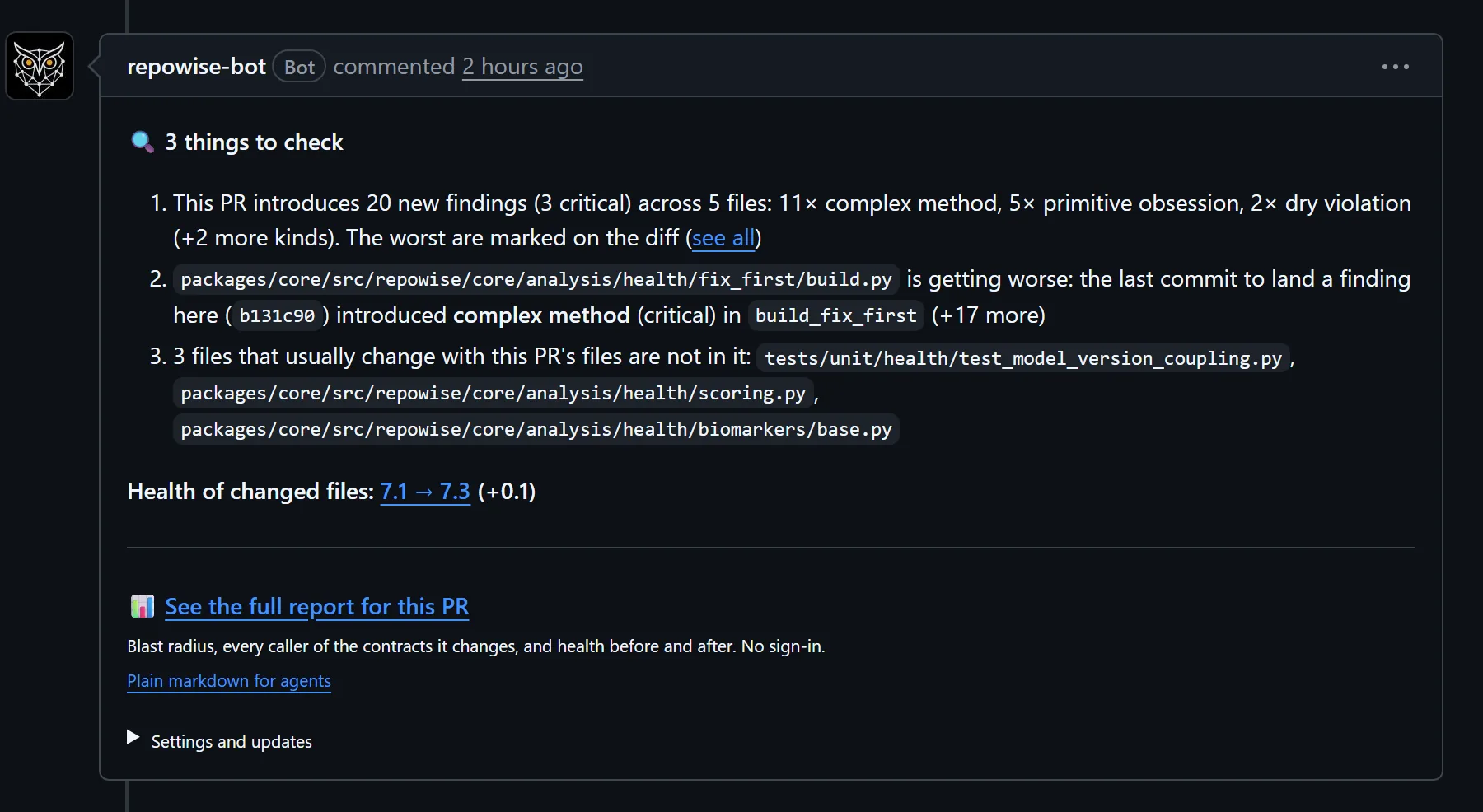
You can open a real one on repowise-dev/repowise#4506. An optional AI review on Pro adds written findings grounded in the same index, at about 15 cents a pull request on average. The repowise bot page covers setup, and the change risk feature explains the scoring behind it.
The same checks run from the terminal before you open the PR:
repowise risk main..HEAD # size and spread ranked against recent commits, prior bug fixes, missing co-changes
For a side-by-side of the bots that review pull requests, see the best GitHub PR review bots in 2026.
How big should a pull request be?
Keep a pull request to one self-contained change, in practice a few hundred changed lines at most. Small PRs get reviewed faster and more carefully. In the 10 repositories in our sample that record approvals as GitHub reviews, median time to merge rose from 4.1 hours for PRs under 50 lines to 8.4 hours for PRs over 1,000 lines.
When a change grows past that, split it: land the refactor first, put unfinished work behind a feature flag, and stack the rest as small PRs that each build on the last. The PR size guide walks through each method with commands.
FAQ
- What is a PR in coding?
- A PR, or pull request, is a proposal to merge a set of code changes from one branch into another. It opens a review page where teammates read the diff, leave comments and approve, and where automated checks such as tests and linters run before the change is merged.
- What is git pull vs a pull request?
git pullis a Git command that fetches commits from a remote and merges them into your local branch. A pull request is a feature of GitHub, Bitbucket and similar platforms that asks other people to review and merge your branch into theirs. One updates your code; the other proposes changing someone else's.- Why is it called a pull request?
- Because you are asking the maintainer to pull your branch into theirs. In distributed Git nobody pushes into another person's repository, so contributors published a branch and sent a request to pull it, which Git still generates with
git request-pull. GitHub kept the name for its web version. - Is a merge request the same as a pull request?
- Yes. GitLab calls it a merge request and GitHub, Bitbucket and Azure DevOps call it a pull request, but both are a reviewed proposal to merge one branch into another, with comments, approvals and CI checks on the same page.
- How do I find my pull requests on GitHub?
- Open github.com/pulls to see the pull requests you created, were assigned or were asked to review. In a single repository, search with
is:pr author:@me. From the terminal,gh pr statusshows your PRs in the current repository andgh pr list --author "@me"lists them. - What is a PR in AI?
- In AI-assisted development, a PR is often opened by a coding agent instead of a person: tools such as GitHub Copilot's coding agent, OpenAI Codex and Claude Code can write a change and open a pull request for a human to review. The review job is the same, but the volume is higher, so teams lean on automated risk signals to decide which agent PRs need a careful read. See code review at agent scale.