On this page
To learn a new codebase in your first week, give each day one small goal with a done state: get it running, trace one request end to end, map the modules and who owns them, ship one small pull request, then write down what you know. Reading files in order is the slowest way in. Running, tracing and changing code makes the system answer back.
| Day | Goal | Done when | Ask the repo |
|---|---|---|---|
| 1 | Get it running | Tests pass on your machine and you can open one real screen or endpoint | "What do I need installed, and which environment variables does it read at startup?" |
| 2 | Trace one request | You can list every file one user action passes through | "Walk me through what happens when POST /login is called, file by file." |
| 3 | Map the parts and the people | You can sketch the main modules and put a name next to each | "What are the main modules, and which ones depend on which?" |
| 4 | Ship one small change | A pull request is open and someone has reviewed it | "What else breaks or changes when this file changes?" |
| 5 | Write it down | A one-page note exists and your onboarding buddy has corrected it | "Why is this module built this way? Is there a decision written down?" |
Scroll the table sideways to see every column.
Why the first week needs a plan
"Get familiar with the codebase" has no acceptance criteria, so it never finishes. Most onboarding docs hand you a README that ends at make setup, a wiki page nobody has edited in years and a diagram with four boxes and one arrow labelled "events". Reading them all leaves you with a great deal of text and no way to change anything.
A small done state per day fixes that. You can tick it even on a day when you feel you know nothing, which on day two you will.
Day 1: get the code running
Running the project teaches more than a day of reading, because the system starts answering back.
- Clone it and follow the README literally. Write down every step that turns out to be missing.
- Get the test suite green on your machine. If it is not green on
main, ask whether that is known before you spend the afternoon on it. - Start the app and open one real screen, endpoint or command.
- Note every environment variable you had to guess.
.env.exampleis usually two variables behind.
Done when tests pass locally and you have seen it do one real thing. Your list of missing README steps is also your first pull request.
If the repo is indexed with repowise, repowise ask answers from the code and cites files:
repowise ask "How do I run this locally? List the services and the commands."
repowise search "environment variables"
Ask the repo:
- How do I run this locally? List the services it needs and the commands, with file paths.
- Which environment variables does the app read, and where are they read?
- How are the tests run in CI, and is that different from running them locally?
Day 2: trace one request from start to finish
Pick one thing a real user does, then follow it through the route or handler, the service code, the database call and back out to the response. Logging in, creating an invoice and running the export all work. Put a breakpoint at the entry point and step. Add a log line when stepping gets lost inside a framework.
Write the path down as a list of files and functions. It will be shorter than you feared and messier than the diagram.
Done when you can name every file that one request passes through, in order.
An indexed repo can give you a first draft of that path to check against the debugger. In repowise, get_overview returns the shape of the repository and get_answer traces a named behaviour with citations. Open every file it cites: the answer is a map, and your stepping confirms it.
Ask the repo:
- Trace what happens when [the action] runs, from the entry point to the database and back. Give file paths and function names.
- Where is [the action] handled, and what calls that function?
- Which middleware or hooks run before every request?
Day 3: map the parts and the people
Zoom out to a rough drawing of the main modules, the direction of their dependencies, and a name beside each module so you know who to ask. Git already holds most of this:
# who has written most of a file
git log --format='%an' -- path/to/file.py | sort | uniq -c | sort -rn | head

# what changed most in the last 90 days
git log --since="90 days ago" --name-only --format='' | sort | uniq -c | sort -rn | head -20
The second command is the real map of the team's attention. Files at the top are where your first tickets will probably land.
repowise draws the same picture from the code. The architecture map groups files into communities and draws the import edges between them, and its Trace control shows the path between any two files. The Owners page lists who wrote the surviving lines, and get_context(targets=[...], include=["ownership"]) returns the primary owner, the recent owner and the bus factor for a file.
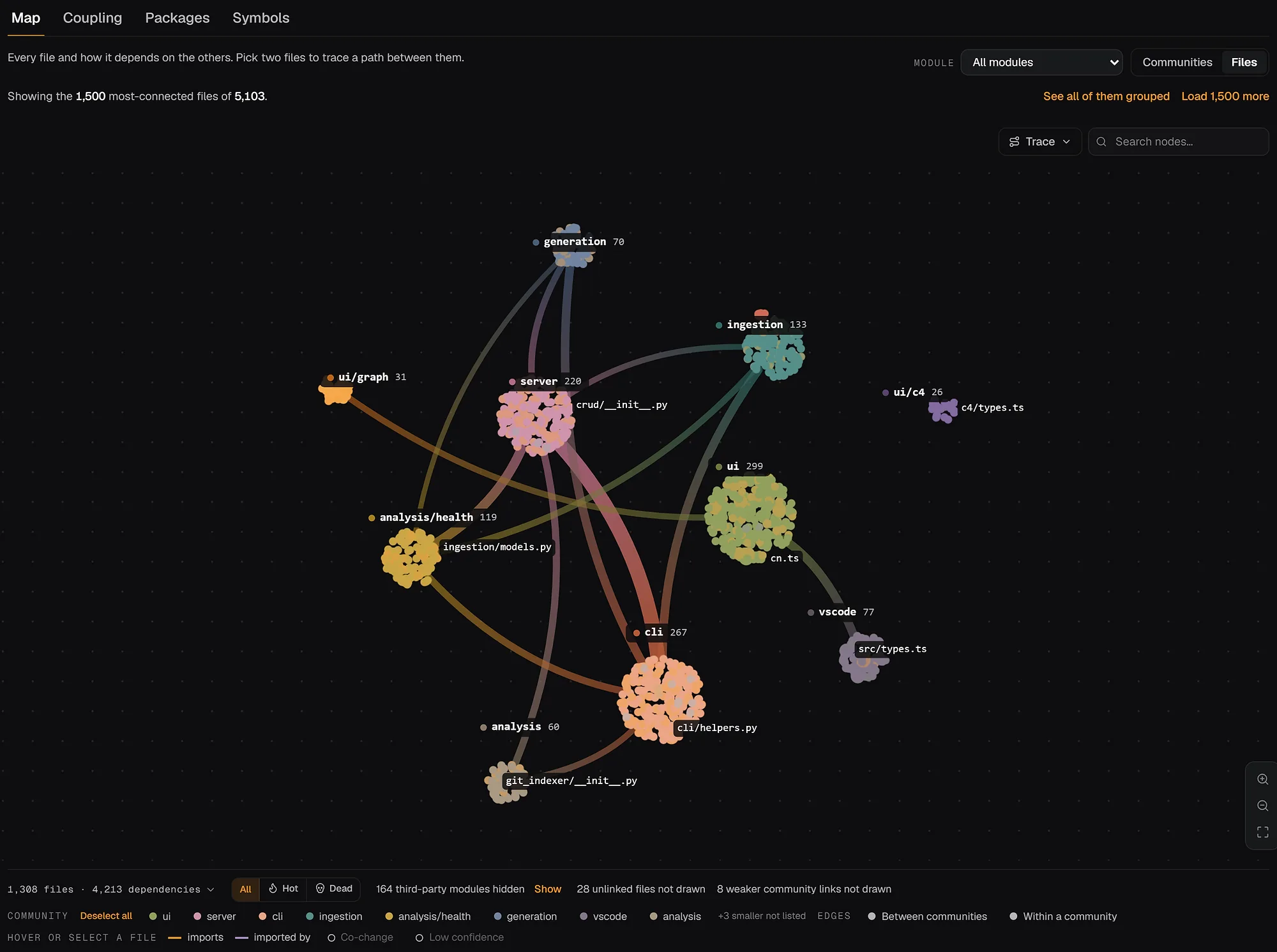
You can open the same views for a public repo: the FastAPI architecture map and its contributors page. The ownership guide explains the git side in more depth, including why "who committed last" is the wrong question.
Done when you have a sketch with modules, arrows and one name per module.
Ask the repo:
- What are the main modules, what does each one do in one sentence, and which ones depend on which?
- Who knows the most about [module]? Who has changed it recently?
- What are the entry points into this codebase?
Day 4: ship one small change
Pick something small: a missing README step from day 1, a good first issue, a log message that confused you on day 2. Small is the point. The change is an excuse to learn the branch rules, the CI, the review process and the things nobody wrote down, like the reviewer who wants tests in a separate commit.
Before you edit, check what the file is connected to:
# files that usually change in the same commit as this one
git log --format=%H -- path/to/file.py | head -50 | xargs -n1 git show --name-only --format= | sort | uniq -c | sort -rn | head
If a file always changes together with another one, your change probably needs both. With an index, repowise risk --target path/to/file.py reports the file's owner, bus factor and fix history, and get_risk(changed_files=[...]) from an agent covers a set of edits and the tests worth running.
Done when a pull request is open and at least one person has reviewed it. The review comments are the most useful thing you will read all week.
Ask the repo:
- What depends on [file]? What would break if I changed [function]?
- Which files usually change together with [file]?
- Which tests cover [function], and how do I run only those?
Day 5: write down what you know
Keep the note to one page, written for you first and your team second.
- One sentence on what the system does.
- The entry points.
- The request you traced on day 2, as a list of files.
- Your module sketch with names.
- Questions you still have.
Send it to your onboarding buddy and ask them to correct it. They will fix two things you were sure about, which is the reason to send it. The reading guide has a longer template built for audits.
Done when the note exists and someone else has read it.
Ask the repo:
- Why is [module] built this way? Are there decisions or pull requests that explain it?
- What looks unused or deprecated, so I can stop reading it?
- What are the riskiest files to change, and why?
repowise has a direct tool for the first two: get_why returns the decision records and git history behind a module, and get_dead_code lists unreachable files and unused exports so you know which code to skip.
How to ask the repo good questions
Name the thing, ask for paths, open them, and cross-check against git. These habits improve the answers from any assistant.
- Name the target. "How does billing work" gets an essay. "What calls
create_invoiceand where is the result stored" gets file paths. - Ask for paths and line numbers, then open them. An answer you cannot check is a rumour.
- Ask it to say when it is unsure. repowise's
get_answerreturns aconfidenceand citations for this reason. - Check the answer against git. If it says a module is central, the commit log should agree.
An assistant that sees only the files you have open has to guess at the rest. One with the whole repository indexed, including the dependency graph and git history, can answer the day 3 and day 4 questions directly. That is the difference between the two kinds of context, and it matters most in this week. repowise serves it to Claude Code, Cursor, Codex and other MCP clients through ten tools, and repowise init --yes --no-prose indexes a repo without an API key.
Mistakes to skip in week one
- Reading it cover to cover. A codebase has no plot.
- Refactoring what looks wrong. You do not yet know why the code is like that.
- Changing the linter config. It is a team agreement, not a bug.
- Waiting until you understand everything before asking. That day does not come.
How we wrote this
The checklist comes from our own first weeks, checked in October 2026 against the onboarding advice that ranks for this search, most of which agrees on "run it first" and "trace one path" but stops short of a day-by-day plan. The git commands were run against a real repository on 12 October 2026. The repowise features named come from the docs for release 0.56, and the linked pages are live public pages.
FAQ
- What is a good tool to onboard engineers onto a codebase?
- For the engineer, the useful kit is the repo itself, a debugger,
git logand an assistant that can see the whole repository, including files you have not opened. For the team, add docs generated from the code so they stay current, an ownership view, and a way to answer questions without interrupting the same senior engineer. The onboarding tools comparison covers the options. - How long does it take to learn a new codebase?
- A week or two to be useful in one focused area, and months to feel at home. Nobody knows all of a large codebase. Aim for one traced request and one merged change in the first week, and treat everything else as a bonus.
- Should I read the whole codebase before making changes?
- No. Read the path one real request takes, the modules around your first ticket and the tests for them. Most of a large codebase you will never need to read.
- How can I use AI to learn a new codebase?
- Use it for navigation questions: where something is handled, what calls a function, what changes together. Ask for file paths, open them and check the answer against the code. For why something is built a certain way, look for the pull request or decision record behind it;
get_whyin repowise surfaces both. - What onboarding developer tools should a team set up?
- Start with a README that actually runs, a working
.env.example, a short list of first issues and an owner name per module. Then add docs and maps generated from the code so they do not go stale. The team-side onboarding guide goes through the first 30 days from the manager's side.